Every time you receive a payment confirmation, get a shipping update, or see your CRM automatically log a new lead, two technologies are working behind the scenes, APIs and webhooks. They both help software applications talk to each other, but they do it in completely different ways.
For business owners evaluating software tools, setting up integrations, or working with a tech team, understanding the webhook vs. API difference can save you time, money, and a lot of confusion. This guide explains how they work, when to use each, and what benefits each one brings to your business.
What Is an API?
An API, short for Application Programming Interface, is a set of rules that allows one software application to request data or trigger an action in another. It is one of the most foundational building blocks of modern software.
The easiest way to understand what is an API is through a restaurant analogy. You are the customer. The kitchen is the software system holding the data or functionality you need. The API is the waiter, it takes your request, delivers it to the kitchen, and brings back the result.
When your accounting tool pulls today’s exchange rate, it sends a request to a currency API and gets back the current figure. When your website shows an embedded map, it is calling Google’s mapping API. When a customer checks out and clicks “Pay with PayPal,” an API connects your store to PayPal’s payment system in real time.
How an API works:
- Your system sends a request to the other system (asking for specific data or an action)
- The other system processes the request
- A response is sent back to your system with the requested information or confirmation
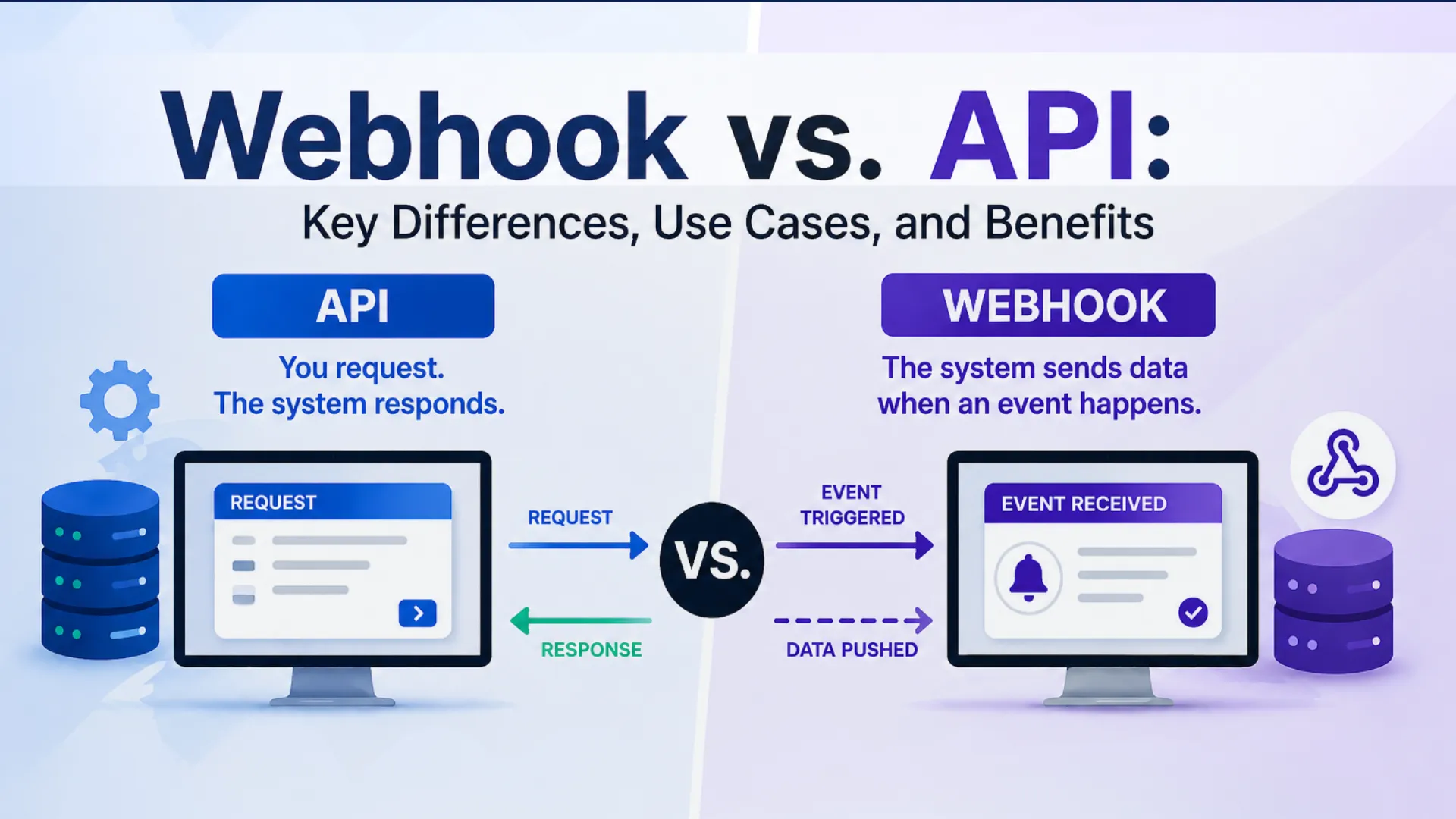
APIs are request-driven. Nothing happens until your system asks. This gives you precise control over when data is fetched and what you receive, but it also means your system has to keep asking if it wants to stay up to date.
What Is a Webhook?
A webhook is a way for one application to automatically send data to another the moment a specific event happens, without being asked. If an API is a waiter you call over when you are ready, a webhook is a text alert that fires the instant something important occurs. You do not have to ask. The information comes to you.
A simple webhook example: a customer pays for an order on your website. The moment that payment is confirmed, a webhook instantly pushes a notification to your inventory system to reduce stock, your email platform to send a confirmation, and your CRM to log the purchase. No manual steps. No delay.
Webhooks are sometimes called “reverse APIs” because instead of your system pulling data from another, the other system pushes data to yours. The term “what is webhook API” often comes up because webhooks and APIs are so closely related, but they are distinct mechanisms. A webhook is not an API you call; it is a listener you set up so that data arrives automatically when something happens.
How Do Webhooks Work?
Understanding how webhooks work does not require a technical background. Here is the process in three steps:
Step 1: You set up a destination
You provide a URL (a web address) to the platform that will be sending data. This tells that platform where to send information when an event occurs. Most business tools, including Stripe, Shopify, HubSpot, and Salesforce, let you do this from their settings panel.
Step 2: An event is triggered
Something happens in the source system, a payment succeeds, a form is submitted, a subscription is cancelled, a support ticket is opened. That event fires the webhook.
Step 3: Data is automatically delivered
The source system immediately sends a data package to your destination URL. Your system receives it and takes the appropriate action, updating a record, notifying a team member, or triggering the next step in a workflow.
How does a webhook work in a real business scenario? A marketing agency uses a contact form on their website. Every time a prospect fills it out, a webhook fires instantly, creating a CRM record, assigning it to a sales rep, and triggering an automated email sequence. No one has to manually export form data and import it into the CRM. It is all handled the moment the event occurs.
That is how webhooks work in practice: they eliminate the gap between an event happening and your systems knowing about it.
Webhook vs. API: Key Differences
The core webhook vs. API difference comes down to who initiates the conversation and when data moves.
| Feature | API (Application Programming Interface) | Webhook |
|---|---|---|
| How it works | Your system requests data when needed | Data is automatically sent when an event occurs |
| Who initiates | Your system (client) | External system (server) |
| Timing | On demand | Real-time (trigger-based) |
| Data direction | Two-way (request and response) | One-way (data is pushed to you) |
| Resource use | Higher if polling frequently | Lower, only runs when triggered |
| Best for | Fetching data, complex operations, user-driven actions | Notifications, automation, real-time updates |
| Setup effort | Moderate | Simple to moderate |
| Error handling | Full control over retries and logic | Depends on the provider’s retry mechanism |
Similarities Between Webhooks and APIs
Despite how differently they operate, webhooks and APIs share more common ground than most people realise:
- Both enable communication between applications.
Whether a system is asking or being notified, both mechanisms exist to let separate software tools exchange data. - Both use standard web protocols.
APIs and webhooks both rely on HTTP or HTTPS to transfer data, making them compatible with virtually any modern platform. - Both use defined endpoints.
In both cases, a URL serves as the connection point where data is sent or received. - Both support automation.
Whether triggered by a request or an event, both reduce the need for manual data entry and human intervention. - Both are widely used across industries.
From e-commerce and finance to healthcare and SaaS, businesses everywhere rely on both APIs and webhooks to keep their tools connected.
Benefits of Webhooks
Understanding the benefits of webhooks helps clarify why so many modern business tools rely on them for real-time operations.
Real-time data delivery.
Webhooks push data the instant an event occurs, meaning your systems are always working with current information rather than data that was accurate the last time someone checked.
Reduced manual work.
Because webhooks fire automatically, they eliminate entire categories of manual data entry, such as copying form submissions into a CRM or updating inventory after every order.
Lower resource consumption.
Without webhooks, a system has to repeatedly ask, “Has anything changed?” Webhooks remove this entirely. Data is only sent when it needs to be, making them significantly more efficient at scale.
Faster automated workflows.
When a webhook triggers the next step in a process instantly, multi-step workflows that once took hours of manual coordination can run in seconds.
Easier to set up than a full API.
For many common business use cases, configuring a webhook through a platform’s settings panel requires no coding and can be done in minutes.
Benefits of APIs
APIs bring a different set of strengths that make them essential for more complex, controlled integrations.
Precise control over data
With an API, you decide exactly what data you retrieve, when you retrieve it, and how often. This is valuable for dashboards, reports, and any workflow where timing and specificity matter.
Two-way communication
Unlike webhooks, APIs allow your system to both send and receive data. You can create records, update them, delete them, or trigger actions in another system, all from your end.
Reliability and error handling
If an API request fails, you can retry it immediately. You have full visibility into whether the request succeeded and can handle errors in real time.
Versatility
APIs power an enormous range of API integration types, maps on websites, payment processing, login systems, and data exports. Their flexibility makes them the default integration method for most software platforms.
Widely supported
Almost every major business software platform exposes an API. If two tools need to work together in any meaningful way, there is almost certainly an API available to make it happen.
Webhook Use Cases
Webhook use cases are most valuable in situations where timing is critical and manual processes create unacceptable delays.
- E-commerce: Whether you are running a Shopify store or a custom eCommerce web development build, webhooks trigger inventory updates, shipping notifications, and abandoned cart alerts the moment each event occurs.
- Payments: Receive instant confirmation when a transaction succeeds, fails, or is disputed. Automatically update invoices and accounting records without manual reconciliation.
- Lead management: Push new form submissions and sign-ups into your CRM in real time, assign them to a rep, and start a follow-up sequence without human involvement.
- Customer support: Open a ticket the moment a customer sends an email or submits a request. Notify the right team member instantly when a high-priority issue is flagged.
- Internal operations: Alert your team in Slack or Teams when a contract is signed, a project milestone is reached, or a critical threshold is crossed.
API Use Cases
APIs are the right choice when your system needs to fetch or send specific data on demand, or when the interaction is more complex than a simple event notification.
- On-demand data retrieval: Pulling a customer’s order history, retrieving live financial data, or loading product inventory figures for a report.
- Website integrations: Embedding maps, payment forms, live chat tools, or social media feeds on your website.
- Scheduled data syncs: Syncing records between two systems on a nightly or hourly schedule, where real-time delivery is not required.
- Complex workflows: Any integration that requires fetching data, modifying it, and writing it back to another system, such as syncing customer data across platforms with transformation logic in between.
- User authentication: Powering “Log in with Google” or “Sign in with Apple” features on your own platform.
Webhook Integration: How to Get Started
A webhook integration is simpler to set up than most business owners expect. The major platforms that support webhooks, including Stripe, Shopify, HubSpot, Salesforce, PayPal, and many others, provide built-in configuration options accessible through their settings.
The typical process looks like this:
- Go into the settings of the platform that will be sending data
- Add your webhook destination URL (provided by your receiving platform or developer)
- Select the events that should trigger the webhook
- Run a test to confirm data is flowing correctly
For many common use cases, no coding is required. No-code tools and automation platforms handle webhook integration through a visual interface. For more customised web app development setups, a developer can typically configure the integration in a matter of hours.
The most important business question is not how to set up a webhook, but which events in your workflow are worth automating. A practical starting point: identify your team’s most repetitive, time-sensitive data tasks and ask whether they could be handled automatically the moment the triggering event occurs.
How to Choose Between a Webhook and an API
Here is a practical decision guide for business owners:
Choose a webhook when:
- You need your systems to react instantly when something happens
- The task is event-driven (payment received, form submitted, order shipped)
- You want to reduce manual data handling between tools
- Real-time notifications matter to your team or your customers
Choose an API when:
- You need to retrieve specific data on demand
- You want two-way communication between systems (read and write)
- Your workflow involves complex data retrieval or transformation
- You need precise control over timing and what data is accessed
Use both when:
- You want a complete integration that reacts to live events and also retrieves data on demand
- A common example: a webhook notifies you the instant a payment fails, and an API call retrieves the customer’s full transaction history so your team has the context they need
In practice, the most robust business integrations use webhooks and APIs together, each handling the tasks it is best suited for.
Final Thoughts
The webhook vs. API debate is not really a debate at all. They are complementary tools designed for different situations. APIs give your systems the ability to ask questions and get answers on demand. Webhooks give other systems the ability to notify you the moment something important happens. Together, they make it possible to build the kind of connected, automated business operations that eliminate manual work and keep every tool in sync.
For business owners, the practical takeaway is straightforward, when you are evaluating software or planning integrations, look for platforms that support both. Working with the right technology partner ensures your webhooks and APIs are set up correctly, connected securely, and built to scale with your business. Webhooks tell you when things happen. APIs let you act on them. That combination is what modern, efficient business operations are built on.
Tags
Categories
Recent Posts
Popular Posts
- How to Choose a Reliable Offshore Development Partner?
- Transforming Web Development with HTMX’s Declarative Approach for Dynamic UIs
- Top 15 Ecommerce Growth Strategies to Maximize Sales in 2026
- What is B2B Web Design? Benefits, Best Practices, and Examples
- Why Your Conversion Funnel Needs a Composable Commerce Solution?