- What is Sketch?
- What is HTML?
- What is the Sketch to Responsive HTML Conversion Process?
- Why Choose Convert Sketch to HTML?
- Best Strategies for Sketch to HTML Conversion
- Methods of Converting Sketch to HTML
- Benefits of Converting Sketch to HTML for Enterprises
- Understanding the Cost of Converting Sketch to HTML
- Why Choose CSSChopper for Sketch to HTML Services
Design itself does not create impact. It helps build a highly performing website that influences user experiences. That’s the reason why businesses are converting their sketch design to HTML in order to turn their visual concepts into highly functional websites in 2026.
Simply put, when we plan to transition from sketch to responsive HTML, we are not just translating the design files into code. Rather, we are building a foundation for performance, responsiveness, and SEO. Creating a clean HTML also helps ensure faster website load time, better accessibility, which helps improve online visibility for a brand.
For businesses, this means that the design layout and components are well-positioned, interactive, and user-friendly, while keeping scalability and maintainability in mind. With this perspective, this guide helps business leaders understand how they can convert their sketch designs into optimised HTML code.
For this understanding, we will cover the methods, strategies, and best practices that leaders need to know about sketch-to-HTML to create a fully-functional, SEO-ready website.
What is Sketch?
Sketch is a design tool that works as an alternative to Photoshop for designers and website developers. It helps teams create the visual layout of websites and apps with ease and flexibility.
Simply, it allows professionals to design elements like:
- Page layouts including headers, sections, and footers
- UI components like buttons, forms, and cards
- Defining user flows
So, this tool helps create a blueprint of a website, focusing on design aspects like colours, typography, and spacing that impact user experience.
What is HTML?
HTML (HyperText Markup Language) is the standard language that is used to create the structure of the website design displayed on the browser. So, it simply helps define how elements like text, images, and links will be organised and displayed on the digital platform.
So, we can clearly understand that:
- Sketch shows how a website should look and
- HTML is the code that helps put the design into the right structure
So, if you want to integrate any paragraphs, images, forms, or links into your website, you need to add that to the HTML code. This also makes it easy for search engines to crawl and index the page, which keeps the website SEO-focused, accessible, and highly performing.
What is the Sketch to Responsive HTML Conversion Process?
As we understand the essence of these two aspects, the next logical step is to dig in and understand what this sketch-to-HTML conversion is that is increasingly gaining traction in businesses.
Simply, this sketch-to-HTML service focuses on transforming your visual design into a fully functional, responsive web structure that is built on the foundation of HTML code. Mainly, this section describes how to convert a sketch to HTML step by step:
Design Analysis and Planning
The first step is to review your sketch design file, understand its layout, colors, spacing, and all the necessary design elements. Teams need to finalize this design, keeping in mind scalability and responsiveness, as this blueprint needs to be changed to HTML code.
Asset Extraction
Now, the images, fonts, icons, and other visual aspects need to be exported from the design. This helps manage page speed and overall website performance. What’s more, this step also forms the foundation for keeping the sketch-to-HTML conversion SEO-aligned.
HTML Structure Creation
Moving to the next step, teams need to build the core structure based on the heading, sections, and navigation, as planned. This allows search engines to understand how the content is placed on a website. Simply, a clear structure helps improve the online visibility for a brand.
Styling the Layout, Typography, and Colors
Leading with structure creation, now it is time to style the icons and layout with the right typography, spacing, and color theme that aligns with your brand. All these aspects personally speak your brand’s story to the users while creating a responsive experience for them.
Assessing Responsiveness and Cross-Platform Testing
Most importantly, every design today needs to be presented to users on different screens. So, the layout needs to be planned and tested across different browsers to ensure a consistent performance. This helps improve a brand’s engagement while reducing its bounce rates.
Conducting the Final Performance Checks
In this step, the code is checked and refined to ensure that the website can load faster and is mobile-friendly. What’s more, this helps the website gain organic traffic and a better SEO ranking.
Deployment and Launch
As we have validated the website structure, design elements, and its functionality, we can now prepare the site for launch. However, this is not the final step. Further, teams should follow up with continuous monitoring and improvements, so that UX is smooth and seamless.
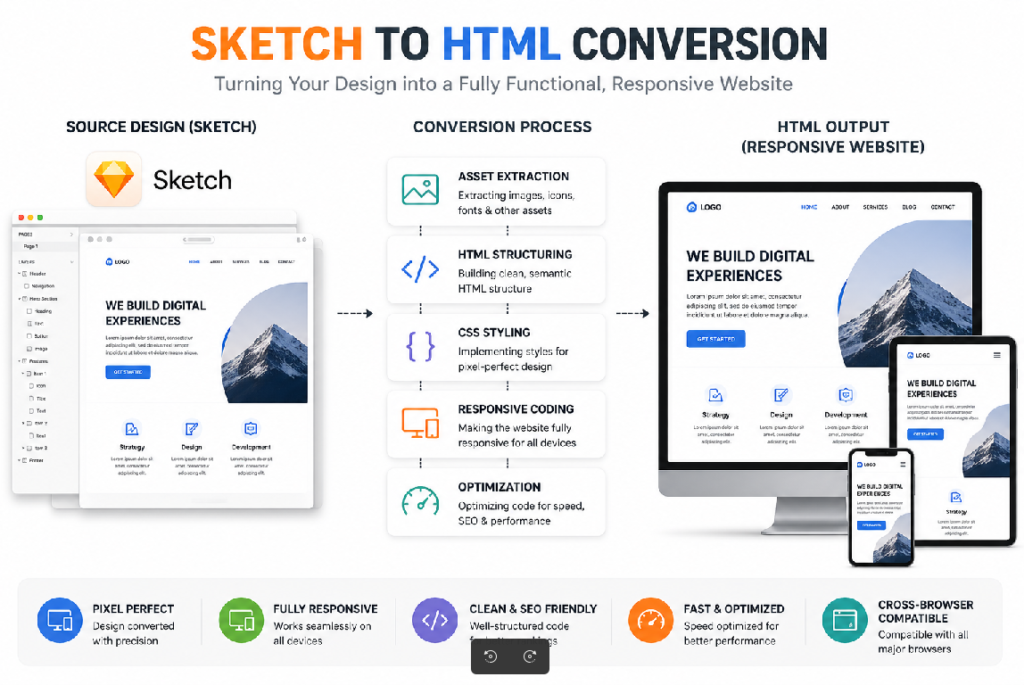 Sketch to HTML conversion process infographic
Why Choose Convert Sketch to HTML?
Focusing on the main essence of the sketch-to-HTML service, leaders now need to understand why choosing this conversion in real-time can help design professionals.
That being said, here are some of the reasons validating this conversion.
- Leaders convert a sketch to HTML to ensure better design accuracy.
- Having a clean HTML structure also helps the search engines crawl and index the site easily.
- This helps the website perform well across devices and scale easily with future updates.
- Overall, an optimized HTML code also helps improve the platform’s load time, which positively influences the SEO performance of the website.
Thus, a sketch-to-HTML conversion makes your website visually appealing, functional, scalable, and SEO-optimized.
Best Strategies for Sketch to HTML Conversion
As we understand this conversion process and its outcomes, let us explore some of the best strategies that decision-makers can adopt to make sure that their websites turn out scalable and highly performance-driven as planned.
They are descriptively shared below:
Code Export
Moving from sketch design to HTML code, this practice focuses on extracting design elements from the sketch and converting them into usable front-end code. Generally, it includes the following:
- Exporting images, icons, and fonts
- Translating layouts into semantic HTML code
- Mapping design styles into CSS
- Overall, this helps speed up the website development process while ensuring clean, SEO-friendly, and lightweight code.
Code Package
This key strategy is adopted by teams when they want to organize the final codebase into a structured, reusable, and scalable format.
In practical situations, it involves steps like:
- Separating the HTML, CSS, and JavaScript logically to save time and optimize the code
- Creating reusable components like headers, footers, and more for repeated use
- Maintaining consistent file naming and folder structures for a clean structure
Overall, this strategy helps teams maintain, update, and scale the project easily.
Code Interactivity
Finally, this strategy in practice works on the principle of adding dynamic components to the regular and static HTML structure.
Commonly, it includes aspects like:
- Animations
- Transitions
- Form validations and user inputs, and
- Interactive elements like menus, sliders, and modals
Overall, these elements drive traffic and SEO results while improving the website’s retention and conversions.
So, all these strategies help teams improve their website performance while also supporting the platform’s scalability and user experiences.
Methods of Converting Sketch to HTML
Moving forward, let us now venture into the best methods by which sketch-to-HTML conversion can be done. Basically, leaders can choose among them based on factors like their project’s complexity, timeline, and required level of control.
That being said, these methods are descriptively shared below for better managerial understanding:
Manual Method
Well, as the name itself suggests, developers here write the HTML, CSS, and JavaScript code from scratch based on their pre-made sketch design.
Simply, it also includes steps like:
- Interpreting layouts and UI components manually
- Writing semantic HTML and structured CSS
Further, developers consistently work to ensure that the website is responsive and well-performing. Essentially, this gives them more control over the code quality. While it takes more time, the results are quite positive too. In this way, the responsibility of the website’s performance falls on the shoulders of the developers, which allows for cleaner, scalable, and production-ready code.
Use of Plugins
Thanks to automation, many developers also use plugins to manage the entire conversion process, where they simply export the UI elements to HTML directly from Sketch.
This also includes aspects like generating HTML structures and speeding repetitive tasks. Herein, plugins can improve your development speed and efficiency. But also note that it is only easier to manage in the case of simple projects.
For more complex workflows, hiring a sketch-to-HTML expert may be a better choice as it promises better chances of a higher SEO ranking and performance online.
Use of a No-code Visual Tool
Last but not least, developers also use no-code visual tools to convert their sketch designs into HTML code structure. This simply means selecting drag and drop options and creating a functional website, without manually writing code. Here, the software manages the code writing in the background.
This approach is also fast and effective, allowing quicker website launches. However, in this case, there is limited room for customization and higher scalability.
So, the best way to convert a sketch to HTML is to match your goals and project complexity with the right method for this conversion, which will help teams get their desired outcomes.
Benefits of Converting Sketch to HTML for Enterprises
For enterprises planning to move ahead with their sketch-to-HTML conversion, here are some of the key points reflecting the benefits you will reap in the future.
- First and foremost, teams will be able to maintain brand consistency across platforms, which will help in improving overall user experiences.
- Having a structured HTML and modular CSS code file will also help make future web changes faster, which may be updates and feature additions.
- Well, a clean code structure also improves the search rankings of the website and enhances the load speed.
- Finally, it also helps teams stay competitive and launch websites faster.
Here, teams also use elements like artboards to plan a responsive layout for their screens. Additionally, they use grids to ensure consistent alignment and spacing, which helps optimize the website in real-time. So, we can say that sketch-to-HTML conversion is a great way for businesses to improve their website performance, thereby improving chances of traction and conversions online.
Understanding the Cost of Converting Sketch to HTML
All this knowledge can truly bring business value if this conversion research is tied to cost and ROI. So, let us broadly understand the cost of using plugins and hiring experts to complete this conversion workflow.
Plugins
In case of plugins, the process is automated, and costs may include:
- Premium plugin subscriptions
- Tool licensing, which can be monthly or yearly, and
- Minimal effort from the in-house developer for code refinement and optimization
- Here, the cost range falls between $10 to $50 per month for most plugins.
Hire a Sketch to HTML Developer
Now, this involves working with third-party experts who can manually help with converting sketch designs into production-ready HTML code.
In this case, sketch-to-HTML outsourcing services generally include the following headers:
- Design analysis and development
- Responsive HTML and CSS code implementation
- Performance optimization and functional testing
- Checking for cross-browser compatibility
Overall, the sketch-to-HTML service’s price for a standard page falls in the range of $150 to $500 per page, based on its complexity. While for a large enterprise, this can go up to $500 to $1500+ per page.
So, this is a better choice for companies that want firm and stronger long-term SEO positioning and website performance.
Why Choose CSSChopper for Sketch to HTML Services
As leaders, you are a step ahead of the game. Having ample research on sketch-to-HTML code conversion, its cost, methods, strategies, and much more, it is now necessary to finalize your service partner. Well, this choice is a make-or-break decision for your brand. Well, CSSChopper can assist you with sketch-to-HTML services.
Partnering with our teams means the following outcomes:
- Having a high-quality, performance-driven code.
- Ensuring pixel-perfect design accuracy
- Maintaining clean, semantic HTML and
- Ensuring a promising SEO-ready, highly-performing, and scalable website with an ongoing partnership and support
With that, we can conclude that our reliable experts are a safe bet for businesses that need a visually consistent, attractive, future-ready web platform in 2026.
Categories
Recent Posts
Popular Posts
- How to Choose a Reliable Offshore Development Partner?
- Transforming Web Development with HTMX’s Declarative Approach for Dynamic UIs
- Top 15 Ecommerce Growth Strategies to Maximize Sales in 2026
- What is B2B Web Design? Benefits, Best Practices, and Examples
- Why Your Conversion Funnel Needs a Composable Commerce Solution?