- What is a PWA?
- How Progressive Web Applications Work
- Key Components of Progressive Web Apps
- Benefits of Progressive Web Apps for Businesses
- PWA Advantages and Disadvantages
- Progressive Web App Examples That Prove the Value
- Progressive Web App Frameworks and Technologies
- How to Build a PWA Step by Step
- How to Choose the Right Progressive Web App Development Company
- When Should Businesses Choose PWAs Over Native Apps?
- How CSSChopper Helps You With Progressive Web App Development
Enhancing mobile web experiences has always been a challenge for businesses trying to balance performance, usability, and reach. Users today expect websites to load instantly, work seamlessly on any device, and behave like native apps without consuming excessive storage or data.
This shift in user expectations has pushed brands to rethink how they deliver digital experiences. If you are wondering what does PWA stand for, it refers to Progressive Web App. It is a modern web solution that combines the accessibility of websites with the functionality of mobile apps.
Progressive Web Applications are gaining traction because they solve real-world problems around speed, reliability, and engagement. According to Grand View Research, the rapid adoption of progressive web apps is reflected in market growth, with valuations rising from $2.08 billion in 2024 to $21.24 billion by 2033, driven by a 29.9% CAGR. It makes them a compelling option for businesses focused on performance and growth.
By leveraging modern web capabilities, PWAs help brands reach wider audiences, improve user retention, and reduce development overhead. As we move forward, this blog will break down how PWAs work, their benefits, real-world examples, and key decision factors, supported by clear comparisons and tables for easier understanding.
What is a PWA?
A progressive web app is an advanced web solution that delivers an app-like experience directly through a browser. If you’re asking what a progressive web app is, the simplest answer is this: it is a website enhanced with advanced web capabilities that behaves like a mobile application.
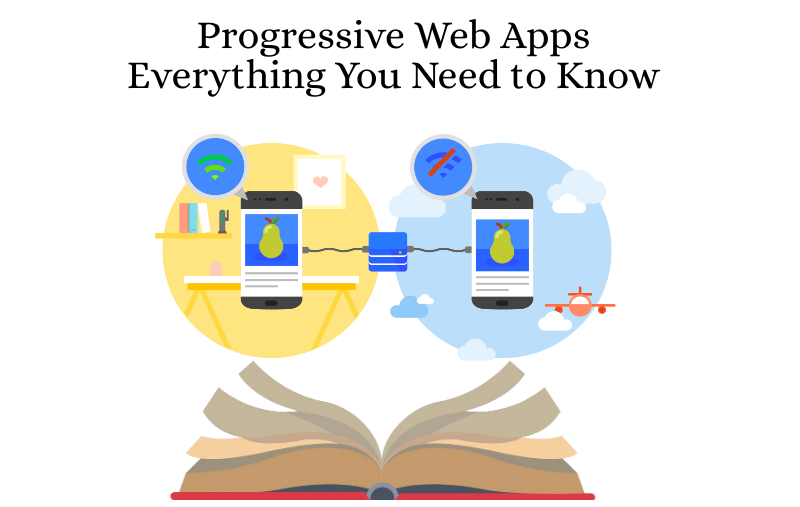
PWAs use standard web technologies and modern APIs to deliver speed, reliability, and engagement across devices. Unlike traditional websites, PWAs are different from web apps because they offer offline functionality, background syncing, and app-like interactions without relying on constant internet access.
While standard web apps rely heavily on constant internet access and browser sessions, PWAs retain functionality even in low-network conditions and feel closer to native mobile apps.
How Progressive Web Applications Work
PWAs are built on modern web standards that allow websites to behave more like native apps. At a high level, progressive web applications work by combining browser capabilities with background processes that enhance performance, reliability, and user engagement.
- When a user visits a PWA for the first time, the browser loads it like a normal website. Behind the scenes, the application registers background scripts that manage caching, data storage, and network requests.
- These scripts ensure that key content is stored locally on the user’s device, allowing the app to load quickly on repeat visits and continue functioning even when the internet connection is slow or unavailable.
- Another important aspect is how PWAs handle updates. Instead of forcing users to download new versions manually, updates happen silently in the background. This keeps the experience smooth and always up to date.
- Combined with responsive design and secure delivery, this working model enables PWAs to deliver consistent performance across devices while maintaining the accessibility and reach of the web.
Key Components of Progressive Web Apps
The performance and reliability of a PWA depend on a set of core building blocks that work together behind the scenes. These components form the technical foundation of progressive web app development and are responsible for delivering a fast, secure, and app-like experience on the web.
1. Service Workers
Service workers act as background scripts that manage caching, offline access, and network requests. They enable features like instant loading, offline functionality, and push notifications by intercepting browser requests and serving cached content when needed.
2. Web App Manifest
The manifest file is a JSON configuration that defines how the app appears to users. It includes details such as the app name, icons, start URL, theme color, and display mode. This file allows users to install the PWA on their home screen and launch it like a native app.
3. HTTPS Security
PWAs are served over HTTPS to ensure secure data transfer. This protects users from attacks, builds trust, and is required to enable service workers and other advanced browser features.
4. Caching and Offline Storage
Modern storage mechanisms, such as the Cache API and IndexedDB, enable PWAs to store data locally. This ensures consistent performance, even in poor network conditions.
Benefits of Progressive Web Apps for Businesses
Progressive Web Apps help businesses deliver faster, reliable, and engaging digital experiences while reducing development overhead. These solutions are designed to improve performance, accessibility, and user satisfaction across devices and network conditions.
Faster Performance and Better User Experience
One of the biggest benefits of progressive web apps is speed. PWAs load almost instantly, even on slow networks, because critical resources are cached in advance. Faster load times reduce bounce rates and help users interact with content without frustration. This directly contributes to smoother journeys and higher engagement.
Offline and Low-Connectivity Access
Another key benefit of PWA adoption is the ability to function offline or in poor network environments. Users can continue browsing previously loaded content, submit forms, or complete actions without interruptions. This reliability is especially valuable for mobile-first audiences.
Improved Engagement and Conversions
Many progressive web app benefits come from app-like features such as home screen installation and push notifications. These capabilities help brands re-engage users, encourage repeat visits, and drive meaningful actions that improve conversions.
Lower Development and Maintenance Costs
From a commercial standpoint, the benefits of PWA for business include reduced costs. A single PWA works across platforms and devices, eliminating the need to maintain separate native apps while still delivering high performance.
SEO-Friendly and Wider Reach
Unlike native apps, PWAs are indexed by search engines. This improves visibility, organic traffic, and reach, making PWAs a practical and scalable digital solution for growing businesses.
PWA Advantages and Disadvantages
Understanding the strengths and limitations of Progressive Web Apps helps businesses make informed technology decisions. The table below provides a clear comparison of PWA advantages and disadvantages.
| Aspect | Advantages of PWAs | Disadvantages of PWAs |
| Performance | Fast loading speeds due to caching and optimized resource handling | Performance may vary depending on browser support |
| Connectivity | Works offline and performs well on low or unstable networks | Some features still require an active internet connection |
| Development Cost | Single codebase for all devices reduces development and maintenance costs | Advanced features may require additional customization |
| User Experience | App-like navigation, smooth interactions, and home screen installation | User experience can differ slightly across browsers and platforms |
| Device Access | Access to many native-like features such as push notifications | Limited access to certain hardware features, especially on iOS |
| Distribution | No app store dependency; accessible via URLs and search engines | Lower visibility in app stores compared to native apps |
Progressive Web App Examples That Prove the Value
Real-world adoption clearly shows how effective PWAs can be across industries. Each example of progressive web apps below highlights how businesses improved performance, engagement, and user experience by switching to or adopting a PWA approach.
-
Twitter Lite
Twitter introduced its PWA to improve performance in regions with slow networks. The result was a lighter, faster experience that led to higher engagement, including increased tweets per session and lower bounce rates.
-
Pinterest
Pinterest rebuilt its mobile experience as a PWA to reduce load times and improve usability. The PWA delivered faster interactions and significantly increased time spent on the platform, driving stronger user retention.
-
Uber
Uber’s PWA was designed to work smoothly on low-bandwidth networks. It loads in seconds, even on 2G connections, allowing users to book rides quickly without installing a native app.
-
Forbes
Forbes adopted a PWA to enhance mobile performance and content delivery. Faster load times and improved responsiveness increased engagement and reduced bounce rates among mobile readers.
These examples demonstrate how PWAs help brands deliver measurable business outcomes while maintaining broad accessibility.
Progressive Web App Frameworks and Technologies
Choosing the proper progressive web app framework is critical for performance, scalability, and long-term maintenance. Different frameworks serve different business and technical needs. The table below compares the most commonly used frameworks for PWA to help you make an informed decision.
| Framework | Best Use Case | Key Strengths | Considerations |
| React | Dynamic, component-driven PWAs | Fast rendering, strong ecosystem, reusable components | Requires additional libraries for full PWA setup |
| Angular | Enterprise-grade PWAs | Built-in PWA support, strong structure, scalability | Steeper learning curve, heavier framework |
| Vue.js | Lightweight and flexible PWAs | Easy to learn, high performance, flexible integration | Smaller ecosystem compared to React |
| Ionic | Hybrid and cross-platform apps | Single codebase, native-like UI components | Performance depends on the underlying framework |
| Workbox | PWA performance optimization | Simplifies caching, offline support, and service worker management | Used alongside frameworks, not standalone |
This comparison helps align technical choices with project goals, whether you’re building a lightweight MVP or a large-scale enterprise application.
How to Build a PWA Step by Step
Building a Progressive Web App involves a structured process that balances performance, usability, and reliability. This section serves as a simplified progressive web app development guide for teams planning their first implementation.
Step I: Define the Use Case and Goals
Start by identifying what problems the PWA should solve. Determine whether the focus is faster load times, offline access, better engagement, or wider reach across devices.
Step II: Choose the Right Technology Stack
Select a framework based on your project needs, scalability goals, and team expertise. The framework choice directly impacts performance, maintainability, and future upgrades.
Step III: Build a Responsive User Interface
Design a responsive layout that adapts seamlessly to different screen sizes. A consistent UI ensures users get the same experience across mobile, tablet, and desktop devices.
Step IV: Implement Service Workers
Service workers handle caching, background sync, and offline functionality. This step is critical for enabling fast load times and reliable performance in poor network conditions.
Step V: Add a Web App Manifest
Configure the manifest file to define how the app appears on the home screen. This includes icons, theme colors, and display modes, allowing users to easily install the PWA.
Step VI: Test, Optimize, and Launch
Run performance and usability tests using tools like Lighthouse. Optimize load times, accessibility, and security before launching the PWA to ensure a smooth user experience.
How to Choose the Right Progressive Web App Development Company
Choosing the correct progressive web app development services provider requires a balance of technical expertise, strategic thinking, and long-term support capabilities. An ideal partner helps you translate business goals into a high-performing PWA that delivers speed, reliability, and measurable results.
Evaluate PWA Experience
Review the company’s portfolio and case studies to ensure they have hands-on experience building scalable and performance-driven PWAs across industries.
Assess Technical Expertise
Ensure the team is skilled in modern PWA frameworks, service workers, caching strategies, and performance optimization techniques.
Understand Their Development Process
A structured process with clear milestones, documentation, and transparent communication indicates reliability and accountability.
Check Business and UX Understanding
The company should focus on user experience, accessibility, and conversion optimization, not just code delivery.
Review Post-Launch Support
Ongoing maintenance, performance monitoring, and feature enhancements are essential for long-term success.
When Should Businesses Choose PWAs Over Native Apps?
Progressive Web Apps are not a replacement for native apps in every scenario, but they are an excellent choice when speed, reach, and cost-efficiency are priorities. Businesses should consider PWAs when they want to deliver a consistent experience across devices without maintaining multiple codebases.
Launching an MVP or New Digital Product
PWAs are ideal for quickly validating ideas. They reduce time-to-market while still delivering an app-like experience to users.
Targeting Mobile-First or Low-Bandwidth Users
If your audience often operates on slow or unstable networks, PWAs provide reliable performance and offline access that native apps may not handle as efficiently.
Reducing Development and Maintenance Effort
A single PWA works across platforms, eliminating the need to build separate Android and iOS apps while still offering strong performance.
Improving Discoverability and Reach
PWAs are accessible through search engines and shared via URLs, helping businesses reach users without relying solely on app store installs.
Content-Driven or Transactional Platforms
Ecommerce sites, media platforms, and service-based businesses benefit from faster load times and smoother user journeys offered by PWAs.
How CSSChopper Helps You With Progressive Web App Development
CSSChopper helps businesses create scalable and high-performing Progressive Web Apps that deliver app-like experiences across devices. Our approach to progressive web app development focuses on speed, reliability, and seamless usability to meet modern user expectations.
We begin by understanding your business goals, audience behavior, and technical needs. Based on this, our team designs and develops custom PWAs using modern frameworks, optimized architectures, and best practices. We also ensure clarity around Progressive web app development cost, helping businesses achieve better ROI without unnecessary overhead.
Beyond development, CSSChopper provides continuous optimization, security enhancements, and post-launch support. Our focus on performance, scalability, and long-term value ensures your PWA remains future-ready and aligned with business growth.
Categories
Recent Posts
Popular Posts
- How to Choose a Reliable Offshore Development Partner?
- Transforming Web Development with HTMX’s Declarative Approach for Dynamic UIs
- Top 15 Ecommerce Growth Strategies to Maximize Sales in 2026
- What is B2B Web Design? Benefits, Best Practices, and Examples
- Why Your Conversion Funnel Needs a Composable Commerce Solution?