
Improving how users interact with your product has become a business necessity, not a design luxury. In 2026, UX optimization plays a defining role in shaping how people perceive, explore, and trust digital experiences.
With user expectations at an all-time high, brands can no longer rely solely on good visuals. Users want effortless navigation, meaningful interactions, and instant clarity. That’s where thoughtful improvements, guided by modern user experience optimization practices, make all the difference.
A well-optimized experience creates a ripple effect across your entire business. It boosts conversions by removing friction, strengthens retention by creating intuitive pathways, and increases user satisfaction by making every interaction feel purposeful.
As AI-driven behavior patterns evolve and digital competition intensifies, companies that prioritize UX will stand out from the noise. Whether you’re a SaaS platform, an online store, or a service provider, optimizing the user journey ensures that people not only land on your website but stay, engage, and return.
In this blog, you’ll get a clear, step-by-step understanding of how to evaluate your current experience, uncover hidden friction points, improve UX writing, streamline navigation, and analyze user behavior that create measurable business impact.
What Is UX Optimization and Why Does It Matter Today?
UX optimization is the process of improving every touchpoint a user experiences across your website or product. Think of it like rearranging a cluttered store into a clean, easy-to-browse space where customers instantly find what they need.
When done well, ux optimization ensures interactions feel smooth, predictable, and meaningful. It directly ties into UX/UI optimization and overall product performance, helping businesses remove friction. For anyone choosing the best website type for your business, UX is the foundation for how users perceive credibility and value.
Key UX Essentials Today
- Prioritize user-centric design so every decision revolves around user goals, not assumptions.
- Maintain design consistency across pages to reduce confusion and boost trust.
- Use strong visual hierarchy to guide users effortlessly through content.
- Adapt UX for mobile users who expect instant responses and thumb-friendly layouts.
- Recognize Gen-Z patterns such as rapid scanning, short attention spans, and a preference for clean, minimalist interfaces.
- Prepare for AI-assisted experiences, where personalized journeys and predictive interactions are becoming the norm.
Today’s users have zero patience for confusing journeys, and the numbers prove it. According to a report, “88% of online consumers won’t return after a bad user experience.” Data-backed decisions and continuous optimization are mission-critical for brands that want to keep users engaged and coming back.
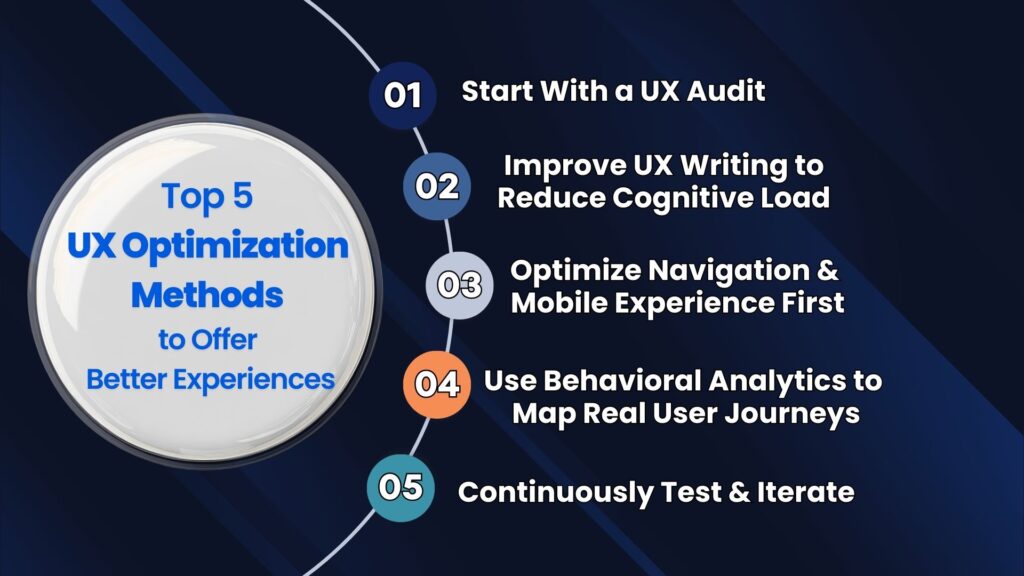
Top 5 UX Optimization Methods to Offer Better Experiences
Enhancing user experience starts with understanding what truly improves clarity, speed, and satisfaction. Let’s look at the top five UX optimization steps that will help you streamline journeys, remove friction, and deliver consistently better digital experiences.
Step 1. Start With a UX Audit
If you’re wondering what a UX audit is, think of it as a full health check for your website. It identifies what’s working, what’s confusing, and what’s silently pushing users away. A UX audit helps you optimize user experience by examining real user behavior, design structure, and content clarity.
During this process, teams evaluate usability optimization, layout logic, and interaction flow to uncover friction points, navigation weaknesses, and pages that require changes before you redesign your existing website. By analyzing patterns, structure, and decisions, an audit highlights where users get stuck and why they leave.
Key Areas a UX Audit Covers
- Usability heuristics: Checks if the design follows established usability principles and intuitive patterns.
- Information hierarchy: Ensures users can quickly understand what’s important and where to go next.
- Funnel drop-off analysis: Reveals which steps cause users to abandon tasks or stop progressing.
- Experience bottlenecks: Identifies slow, confusing, or high-friction interactions that disrupt flow.
- Task completion rate: Measures how easily users can finish key actions like sign-ups, purchases, or form submissions.
A user experience audit uses tools such as Hotjar for heatmaps, GA4 for behavioral insights, heuristic evaluation for usability scoring, and analytics for drop-off tracking. These findings empower teams to refine structure, improve clarity, and close gaps in the user journey.
Apart from that, 70% of online businesses fail due to bad usability. So, this step lays the foundation for long-term usability optimization, guiding future design decisions with data rather than guesswork. By leveraging audit insights, businesses can transform scattered experiences into streamlined, satisfying journeys that evolve continuously as user needs grow.
UX Audit Checklist Overview
| Audit Area | What to Check | Why It Matters |
| Navigation | Menu clarity, labels | Helps users browse effortlessly |
| Page Layout | Visual hierarchy | Guides attention naturally |
| Content | Clarity, tone, relevance | Reduces cognitive load |
| Forms | Steps, fields, errors | Minimizes drop-off |
| Performance | Speed, responsiveness | Higher retention |
Step 2: Improve UX Writing to Reduce Cognitive Load
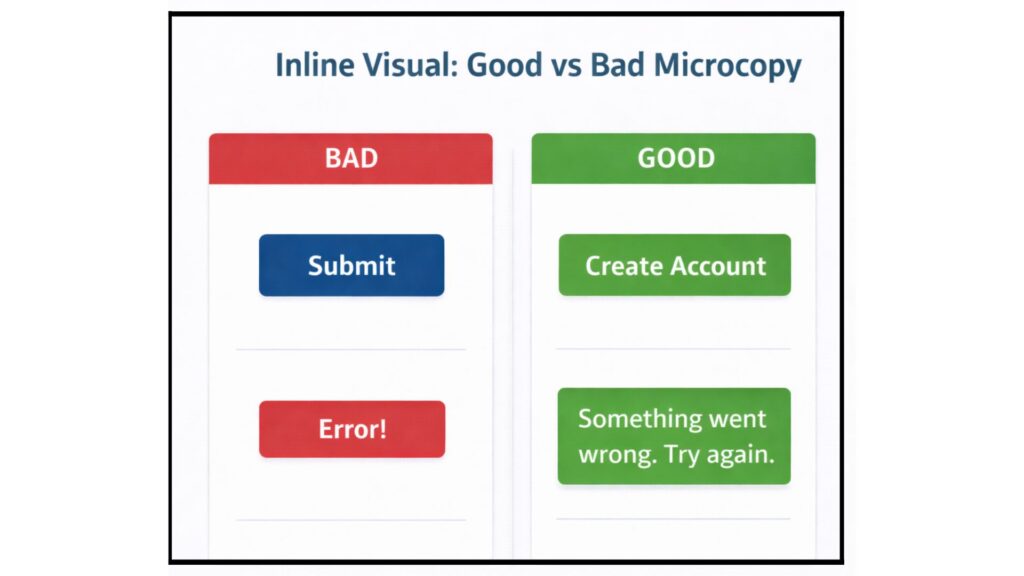
Knowing how to improve UX writing is one of the simplest yet most powerful ways to improve user experience for customers. UX writing shapes the micro-moments that guide users from one step to the next, including microcopy, labels, CTAs, tooltips, and help text.
When done well, it removes confusion, builds confidence, and reduces unnecessary mental effort. Strong copy follows UX writing best practices, such as simplicity, clarity, and consistency, allowing users to move forward with cognitive ease rather than second-guessing what to do next. Good writing also supports smooth Micro-interactions, helping users understand the result of each action instantly.
Key Principles for Effective UX Writing
Write to reduce cognitive load by keeping messages short, scannable, and purposeful.
Maintain consistent tone and terminology across all pages and flows.
Use action-driven CTAs that reflect user intent patterns.
Provide contextual help that appears exactly when users need guidance.
Replace vague labels with meaningful, descriptive wording.
Real Examples of Clear UX Writing
- Confusing CTA → Clear CTA:
“Continue” → “Review Order.” - Ambiguous form field → Descriptive placeholder:
“Name” → “Full Name (as shown on ID).”
Good UX writing works like a friendly guide; it tells users what to expect, what action to take, and what happens next. This clarity significantly improves task completion, encourages engagement, and reduces bounce rates caused by confusion or hesitation.
Step 3: Optimize Navigation and Mobile Experience First
If you want to know how to improve user experience, start with navigation. It is the backbone of every digital journey. A clear navigation structure helps users find what they need without second-guessing their next step.
Strong information architecture, simplified menus, predictable paths, and intuitive navigation all work together to improve ux. This becomes even more important when designing an interactive business website, where users expect interactions that feel smooth, logical, and fast.
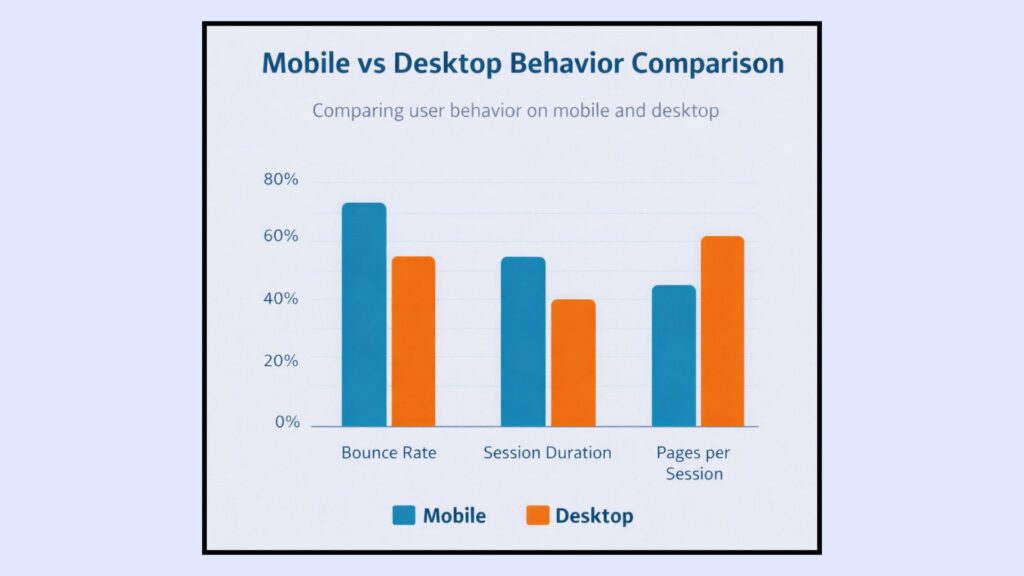
Because mobile-first UX now drives browsing behavior, your experience must be designed for smaller screens first, not adapted as an afterthought. After all, “mobile accounts for 62.73% of global website traffic in Q2 of 2025.”

Key Elements of Strong Navigation & Mobile UX
- Use a clear navigation hierarchy so users know where to go instantly.
- Simplify menu categories and avoid overwhelming lists.
- Apply responsive interface layouts built on scalable, flexible grids.
- Design thumb-friendly zones for easy tapping during mobile browsing.
- Reduce loading times to keep users engaged across all devices.
- Ensure scroll behavior feels natural, no hidden elements or disjointed jumps.
- Use UX improvement strategies such as consistent labeling and route predictability.
- Structure flows to support conversion flow optimization, guiding users step by step toward key actions.
Examples of Good vs Bad Navigation
- Bad: A menu with 12 top-level items and unclear labels like “Solutions” or “Stuff.”
- Good: A clean, 4–5 item menu with descriptive labels like “Pricing,” “Features,” and “Use Cases.”
When navigation feels effortless, users move smoothly through your content, spend more time exploring, and convert at higher rates. With mobile interactions now dominating digital behavior, optimizing these foundational elements ensures every user (regardless of device) enjoys a fast, intuitive, frustration-free journey.
Step 4: Use Behavioral Analytics to Map Real User Journeys
Understanding how users behave on your site is the backbone of user experience enhancement. Tools like GA4, heatmaps, scroll maps, funnel reports, and session recordings uncover how users truly interact, not just how you think they interact.
Through structured user behavior analysis, you can observe patterns, identify friction, and understand where users hesitate or abandon the journey. Platforms like Hotjar and Microsoft Clarity highlight behavioral heatmaps, scroll-depth patterns, and click hotspots, making hidden problems more visible.
GA4’s funnel reports reveal drop-offs at critical stages, helping brands improve task flow efficiency and create a smoother, frictionless user flow.
How Behavioral Data Reveals UX Issues
- Track page segments where users stop scrolling or exit prematurely.
- Identify funnel steps that trigger drop-offs or hesitation.
- Analyze session recordings to spot confusing layouts or interactions.
- Monitor user satisfaction metrics, such as engagement time and return visits.
- Compare device-specific behaviors to refine mobile and desktop flows.
- Detect broken elements, missed clicks, or interaction dead zones.
- Evaluate onboarding steps that overwhelm or confuse new users.
Example Scenarios
- Checkout abandonment: Users exit when shipping costs appear late in the flow.
- Poor onboarding flow: Users drop off when too many fields appear at the first step.
Behavioral insights help you refine user journey optimization by focusing on what users actually need, not assumptions. When you incorporate these insights into UX optimization frameworks, every decision becomes data-driven.
Step 5: Continuously Test and Iterate (A/B, Usability Testing & Feedback Loops)
Continuous testing is the heartbeat of modern digital experience optimization. Even the best design decisions need validation because user behavior evolves, expectations shift, and new patterns emerge. This phase ensures your ux optimization efforts don’t stagnate.
A/B tests compare two versions of a page or element, while multivariate tests evaluate multiple variations together. Preference tests help teams understand which design users connect with more, and prototype tests (often built in tools like Figma or Maze) allow you to validate concepts before development.
For implementation, testing platforms like Optimizely and VWO make experimentation seamless and measurable, offering insights that guide smarter design decisions.
Key Testing Methods That Strengthen UX
- A/B testing to compare specific design elements and interactions.
- Multivariate testing to analyze the impact of multiple on-page variations.
- Prototype testing using clickable mockups or wireframes.
- Preference tests to understand visual or content preferences.
- Surveys and interviews to strengthen customer feedback loops.
- Real-user observation to identify practical usability gaps.
- Applying structured usability testing methods across various device types.
Whether you’re conducting tests early or refining live products, collaboration between design and development ensures ideas become reality. Partnering with specialists in frontend development services helps teams implement UX recommendations without compromising performance or design integrity.
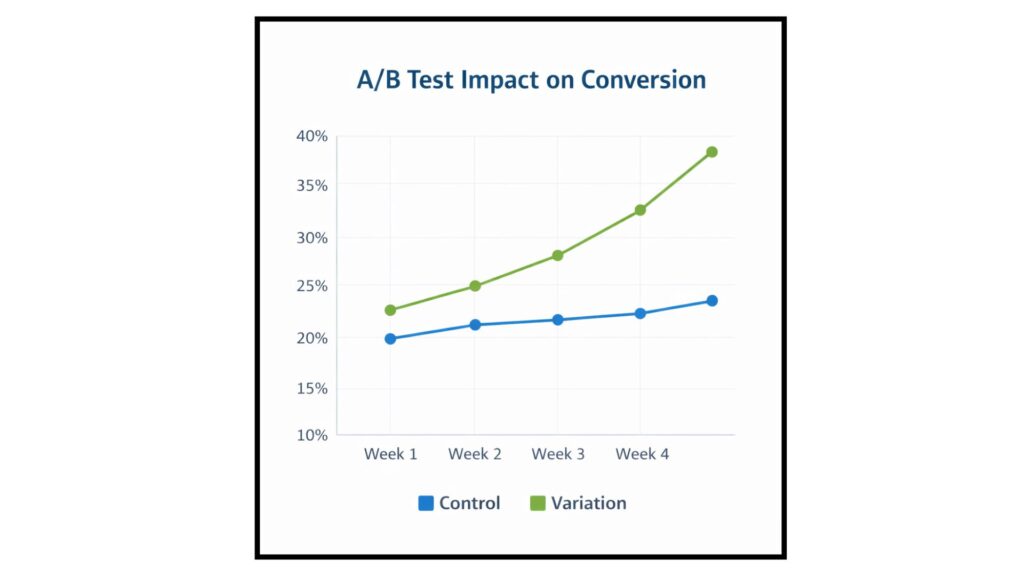
Testing Scenarios and Expected Outcomes
| Experiment Type | What You Test | Expected Outcome |
| A/B Test | CTA text | Higher conversion |
| Usability Test | Navigation flow | Reduced confusion |
| Mobile Test | Menu behavior | Faster task completion |
Conclusion: UX Optimization Is a Continuous Journey
UX success isn’t achieved through a single change; it’s the result of consistent refinement. The five steps you explored work together to create smoother, more intuitive journeys. Each step enhances clarity, usability, and flow, aligning your experience more closely with real user needs.
But here’s the key: UX optimization is never a one-and-done task. User expectations evolve, technology advances, and digital behavior shifts constantly. Staying ahead means refining your experience regularly and acting on data-driven insights.
When you commit to ongoing UX maturity, you see real business impact: higher conversions, stronger retention, improved customer satisfaction, and long-term loyalty. And if you need expert help to enhance your digital experience, consider hiring website development services.
Why CSSChopper Is Your Best Partner for UX Optimization
CSSChopper stands at the forefront of modern digital engineering, blending UX strategy, UI optimization, accessibility, performance, and development excellence under one roof. Our team uses data-backed audits, heatmaps, and analytics to diagnose friction, streamline user journeys, and build experiences that convert.
Whether you’re launching a new product or optimizing an existing platform, we apply industry-leading frameworks, WCAG compliance standards, and testing methods to guarantee measurable improvements in engagement, retention, and conversions.
With years of experience and a proven track record across global brands, CSSChopper turns complex challenges into seamless digital experiences, helping your business stay ahead of the curve and earn customer trust effortlessly.
Tags
Categories
Recent Posts
Popular Posts
- How to Choose a Reliable Offshore Development Partner?
- Transforming Web Development with HTMX’s Declarative Approach for Dynamic UIs
- Why Your Conversion Funnel Needs a Composable Commerce Solution?
- How to Outsource Web Development in 2025: Complete Guide
- What are the Top Web Development Trends for 2025?