- What Is a SaaS CMS?
- How Does a SaaS CMS Work: Architecture Explained
- Key Features of a SaaS CMS in 2026
- Benefits of SaaS CMS for Businesses
- SaaS CMS vs Traditional CMS: A Clear Comparison
- Types of SaaS CMS Platforms
- Popular SaaS CMS Examples (2026 Edition)
- How to Choose the Right SaaS CMS for Enterprises
- SaaS CMS Pricing Models: What to Expect in 2026
- Common Challenges of SaaS CMS and Their Solutions
- Conclusion: Is SaaS CMS the Right Choice?
- Why Businesses Trust CSSChopper for SaaS CMS Solutions
Content today moves fast. Blink, and your competitor ships a landing page, launches a campaign, and captures leads while you’re still waiting on server updates. The explosion of SaaS tools has transformed the way we do business.
For digital-first companies, relying on clunky, legacy systems is like trying to win a Formula 1 race in a horse-drawn carriage. While traditional CMS platforms once ruled the roost, they now struggle to keep pace with the demand for real-time updates and omnichannel delivery.
Enter the SaaS CMS, the nimble alternative designed for an era where speed is the name of the game. According to Statista, the global public cloud market is projected to reach US$1.19 trillion in revenue by 2026, underscoring the shift toward cloud-based CMS solutions.
A SaaS content management system acts as the backbone for modern CMS platforms, offering the agility to scale up or down without missing a beat.
In this guide, you will learn how content management software has moved to the cloud to solve the headaches of maintenance and security. We’ll dive into essential features, key benefits, and real-world examples to help you choose the right fit for your brand.
What Is a SaaS CMS?
At its core, the SaaS CMS meaning refers to a software delivery model where the provider hosts the application and handles all the technical heavy lifting, from security patches to server maintenance (on your behalf).
Unlike traditional setups that require manual installation, a SaaS-based CMS is ready to go right out of the box. It functions as a CMS as a service, allowing your team to focus entirely on crafting stories rather than managing codebases or troubleshooting database errors.
To truly grasp how this shifts the landscape for cms platforms for web development, consider these fundamental differences:
- Hosting & Infrastructure: While on-premise systems require you to buy and manage your own servers, a cloud CMS is fully hosted by the vendor in a secure environment.
- Maintenance: In a self-managed world, you are the mechanic. With SaaS, the vendor provides “white-glove” service, automatically pushing updates so you are always on the latest version.
- Cost Structure: Instead of a massive upfront licensing fee, you utilize a subscription-based model. This “pay-as-you-go” approach makes high-end cloud content management accessible for startups and enterprises alike.
How Does a SaaS CMS Work: Architecture Explained
Understanding the underlying SaaS CMS architecture is key to appreciating its power. At its core, a hosted CMS platform leverages robust cloud infrastructure, meaning your content isn’t confined to a single server in your office.
Instead, it’s distributed across a network of data centers, providing unparalleled reliability and global reach. This distributed nature is fundamental to how a CMS cloud architecture ensures content is always available and performs optimally, no matter where your users are located.
The Flow of Content in a SaaS CMS
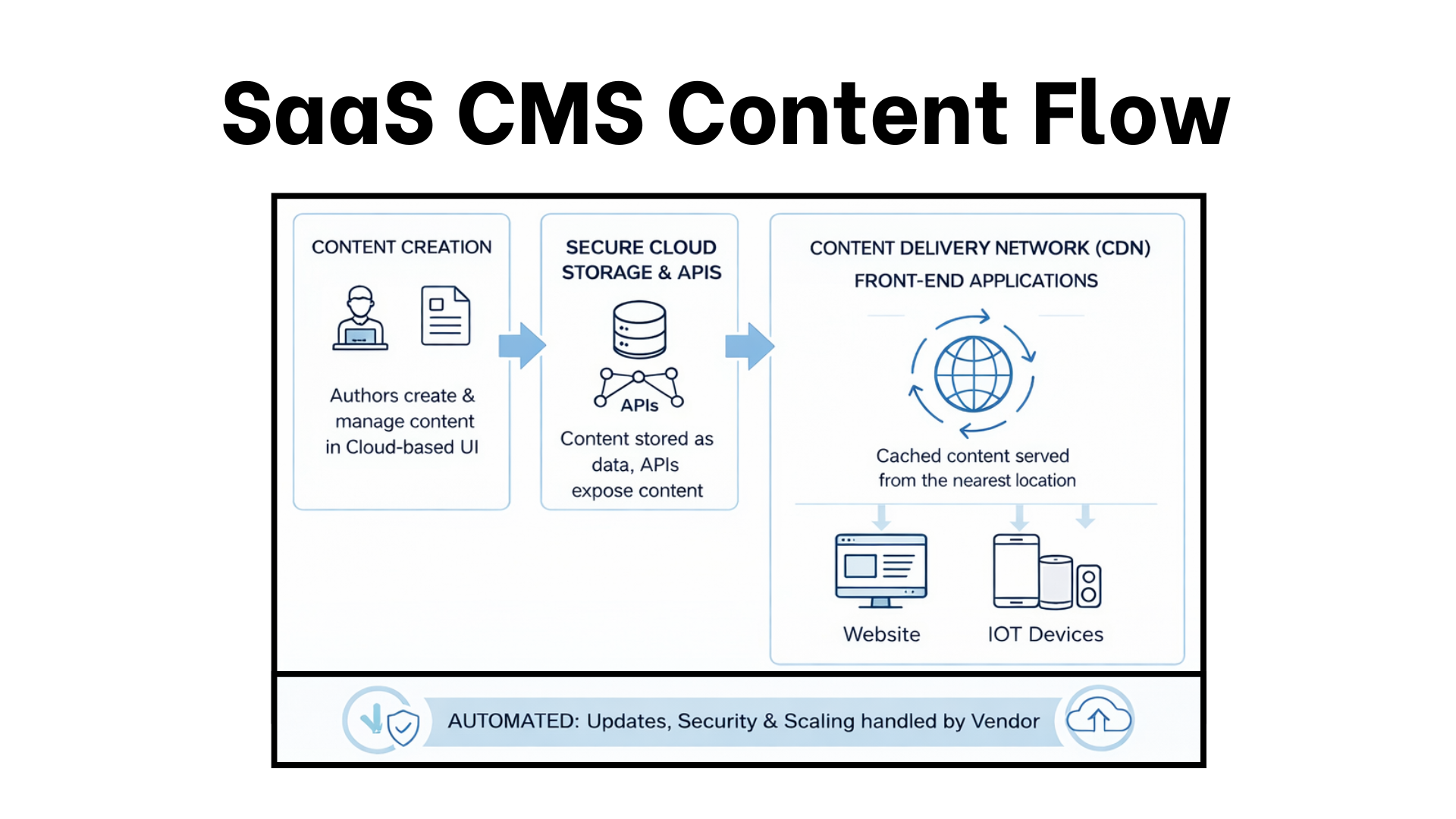
The journey of content within a SaaS CMS is a streamlined process designed for efficiency and speed.
-
Creation & Storage
Authors create and manage content within a user-friendly interface. This content is then securely stored in the cloud, often utilizing advanced database solutions for optimal retrieval.
-
API-First Approach
Many modern SaaS CMS platforms, including headless SaaS CMS platforms, use APIs (Application Programming Interfaces) as their primary means of delivering content. This means content is treated as raw data, ready to be “pulled” by any front-end application. Be it a website, a mobile app, or even a smart device.
-
Global Delivery with CDNs
When a user requests content, it’s delivered via a Content Delivery Network (CDN). CDNs cache your content across multiple geographic locations, ensuring it’s served from the server closest to the user, which drastically reduces load times.
-
Automated Updates & Security
The vendor handles all system updates, security patches, and infrastructure scaling, removing that burden from your team. This proactive maintenance ensures your digital content management system remains secure and up to date.
Here’s a simplified flow diagram illustrating this process:
SaaS CMS Content Flow
Key Features of a SaaS CMS in 2026
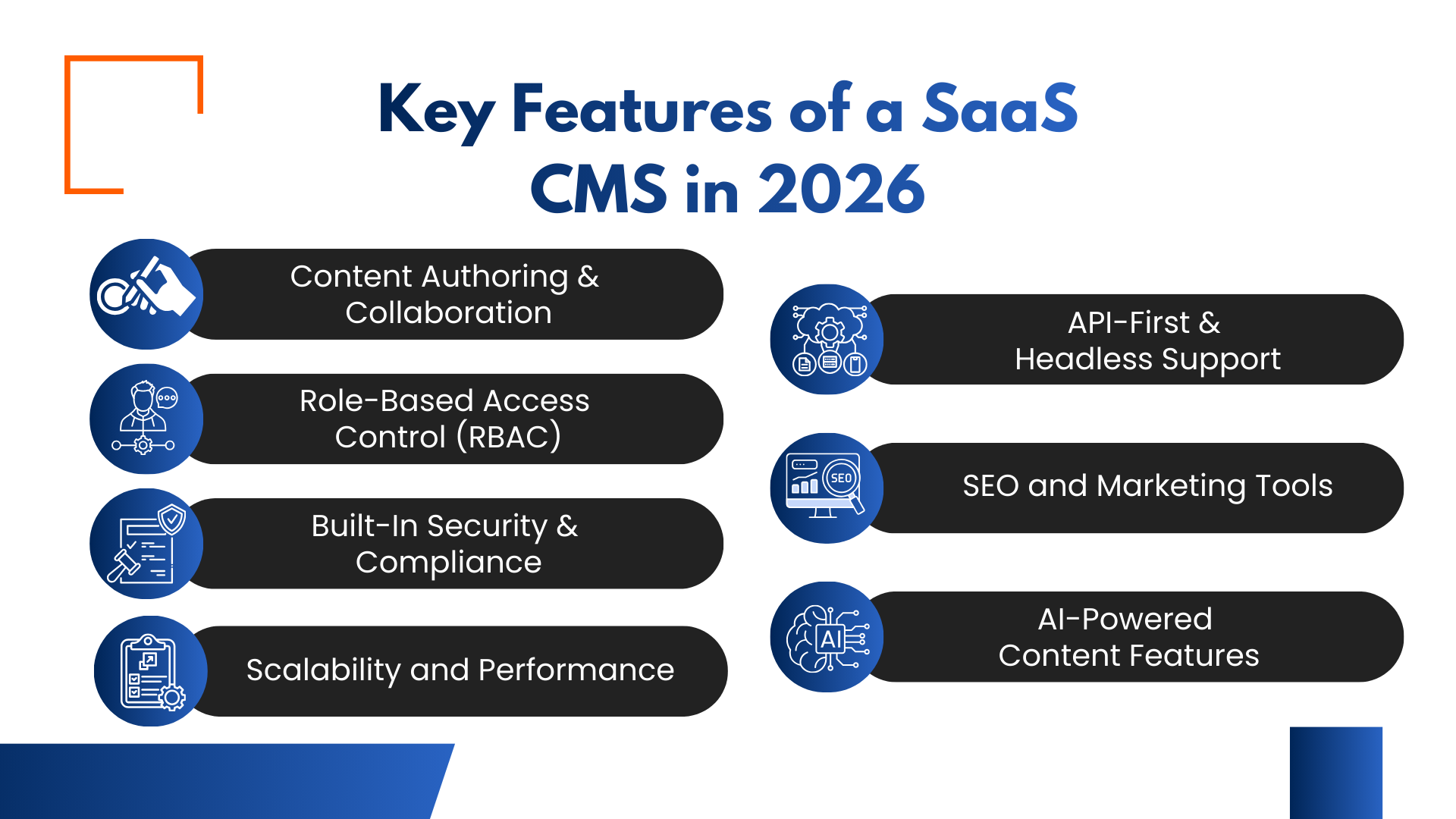
The SaaS CMS features we once considered “premium” have become the baseline for survival. Modern platforms are no longer just repositories for text; they are sophisticated engines that empower teams, protect data, and deliver content at lightning speed. Let’s look at the best SaaS CMS features that empower your business.
1. Content Authoring & Collaboration
Gone are the days of “pinging” a colleague to see if they’ve finished a draft. CMS collaboration tools now offer real-time co-editing, threaded comments, and automated notification workflows. This allows creators to work in harmony, ensuring that the left hand always knows what the right hand is doing.
2. Role-Based Access Control (RBAC)
With great power comes the need for great oversight. RBAC allows administrators to define exactly who can view, edit, or publish specific content. This “need-to-know” approach is a lifesaver for large organizations, preventing accidental deletions or unauthorized brand changes.
3. Built-In Security & Compliance
In 2026, security is not an afterthought; it’s the foundation. A SaaS model provides automatic SOC2 compliance, DDoS protection, and end-to-end encryption. You can sleep soundly knowing the vendor is pulling an all-nighter to keep the hackers at bay.
4. Scalability and Performance
A scalable CMS platform grows with you. Whether you have ten visitors or ten million, the cloud infrastructure dynamically adjusts its resources. By leveraging global CDNs, your content appears on users’ screens in the blink of an eye, regardless of their location.
5. API-First & Headless Support
An API-first CMS decouples the “body” (content) from the “head” (the display). This headless SaaS CMS approach allows you to push content to websites, mobile apps, and IoT devices simultaneously, hitting two birds with one stone.
6. SEO and Marketing Tools
A CMS for marketing teams must include built-in SEO auditors and A/B testing capabilities. From metadata management to schema markup, these tools ensure your content doesn’t just exist, it gets discovered.
7. AI-Powered Content Features
The star of 2026 is the AI-powered CMS. Beyond simple text generation, an AI-driven CMS offers predictive analytics, automated tagging, and smart personalization. It’s like having a digital assistant that knows exactly what your audience wants to read before they do.
By integrating a cmp for cms integration, businesses can bridge the gap between planning and execution, ensuring a seamless flow from strategy to live content.
Benefits of SaaS CMS for Businesses
Adopting a SaaS CMS for business is a game-changer for companies tired of the “death by a thousand updates” cycle. It shifts the maintenance burden to the experts. Let’s look at the SaaS CMS benefits in detail.
Faster Time-to-Market
In the business world, time is money. A scalable content platform allows you to skip the grueling server setup phase. You can go from a blank slate to a live site in record time, staying one step ahead of the competition.
Lower Infrastructure and Maintenance Costs
Why sink your budget into expensive hardware? The benefits of SaaS CMS include a predictable subscription model that eliminates the need for an in-house server farm. You get an enterprise CMS solution without the enterprise-level price tag.
Automatic Updates and Backups
Forget about manual patches or the “did we back that up?” panic. The vendor handles all the heavy lifting behind the scenes. Your system stays fresh as a daisy and secure against the latest threats without you lifting a finger.
Better Team Collaboration
With a central, cloud-accessible hub, your team can work in perfect harmony. Whether they are in the office or across the globe, these cloud CMS advantages ensure everyone is singing from the same songbook in real-time.
Improved Security and Uptime
Uptime is the lifeblood of your digital presence. SaaS providers offer high-availability clusters and 24/7 monitoring, ensuring your site stays up and running even when the going gets tough.
Flexibility for Remote Teams
The 2026 workforce is anywhere and everywhere. An ideal CMS for business provides secure, browser-based access, allowing your creative talent to contribute from anywhere in the world without complex VPNs or hardware hurdles.
SaaS CMS vs Traditional CMS: A Clear Comparison
Choosing between a SaaS CMS vs traditional CMS is often the pivot point between a business that scales effortlessly and one that gets bogged down by technical debt. In 2026, the gap has widened: while traditional systems offer a “blank canvas” for those with deep pockets and large IT teams, they often feel like a ball and chain for agile marketing departments.
A SaaS CMS vs on-premise CMS comparison reveals that the former treats your infrastructure like a utility: reliable and always-on, while the latter treats it like a custom-built engine that requires constant tuning.
For most digital leaders, the cloud CMS vs traditional CMS debate is settled by one factor:
Where do you want your team’s energy to go? Into managing servers, or into creating content that converts? Let’s take a look at the comparison table for more clarity.
| Feature | SaaS CMS | Traditional (On-Premise) CMS |
| Hosting | Included; managed by the vendor. | Self-hosted; managed by your IT team. |
| Maintenance | Automatic updates and security patches. | Manual updates; user-managed backups. |
| Cost Structure | Predictable monthly/annual subscription. | High upfront licensing and hardware costs. |
| Scalability | Instant; scales automatically with traffic. | Manual and requires adding physical/virtual servers. |
| Security | Shared responsibility (Vendor secures core). | Total responsibility (You secure everything) |
| Time-to-Market | Rapid; ready to use out of the box. | Slow and requires installation and configuration. |
The “control” offered by traditional systems is often an illusion that comes at the cost of speed. Unless you have highly specific regulatory requirements that mandate physical data ownership, the agility of the cloud is almost always the superior strategic move.
Types of SaaS CMS Platforms
In 2026, the market has moved beyond one-size-fits-all solutions, branching into specialized types of cms that cater to specific technical and creative needs. Understanding these categories is essential for ensuring effective multi-channel content delivery:
Headless SaaS CMS
This is the “brain without a body.” A headless SaaS CMS decouples the backend from the frontend, delivering content purely via APIs. It is the gold standard for developers who want to build custom experiences on any device.
Hybrid CMS
This model offers a “best of both worlds” approach. It provides the API flexibility of headless architecture but retains the user-friendly visual editors and templates of traditional systems, making it a favorite for diverse teams.
Managed CMS Platform
Often used by enterprises, a managed CMS platform provides a dedicated, high-security environment where the vendor handles all technical overhead, including specific compliance and governance requirements.
No-code / Low-code SaaS CMS
Designed for agility, a no-code CMS allows marketers to build and launch entire digital experiences without writing a single line of code. It’s like using digital building blocks to create a professional storefront.
Whether you need the raw power of an API-first setup or the speed of a visual builder, these modern architectures ensure your content remains fluid, and your teams stay productive.
Popular SaaS CMS Examples (2026 Edition)
The market for the best SaaS CMS platforms is diverse, with specialized leaders dominating different niches. Whether you are a solo creator or a global enterprise, there is a top cloud CMS tailored to your specific workflow.
Here are the most popular SaaS CMS examples leading the pack this year:
1. Contentful
The gold standard for headless SaaS CMS builds. It’s the “engine under the hood” for brands that need to push structured content to websites, mobile apps, and smart devices simultaneously.
2. HubSpot CMS Hub
The ultimate CMS for marketing teams. It seamlessly integrates with the HubSpot CRM, allowing businesses to personalize content based on real-time customer data.
3. Webflow
A favorite for designers, Webflow bridges the gap between high-end visual design and powerful SaaS website management. It’s ideal for those who want “pixel-perfect” control without writing heavy code.
4. Shopify
While primarily an e-commerce giant, it offers a robust SaaS backend that makes it the go-to for merchants who need their content and products to live in perfect harmony.
5. Sanity
Known as a “content operating system,” Sanity is perfect for teams that treat content as data. Its real-time collaboration features are a lifesaver for fast-paced, remote-first companies.
How to Choose the Right SaaS CMS for Enterprises
The stakes for choosing a SaaS CMS have never been higher. For large-scale organizations, the decision isn’t just about a pretty interface; it’s about finding an enterprise CMS solution that can weather the storm of global traffic and complex security mandates.
Navigating this SaaS CMS selection guide requires a keen eye for how a platform aligns with your long-term business roadmap and web app development.
1. Technical Alignment
Assess whether your team is developer-heavy or marketing-led. A headless SaaS CMS empowers developers but can be a hard nut to crack for non-technical users without a robust visual layer.
2. Content Scale & Omnichannel Reach
If you plan to blast content across VR, mobile, and web, you need a CMS for SaaS companies that handles structured data flawlessly.
3. Security & Global Compliance
In an era of tightening regulations, look for SOC2 Type II, ISO 27001, and GDPR readiness. Your CMS must be a fortress, not a sieve.
4. Pricing Predictability
Avoid the “success tax” by choosing the best SaaS CMS for business with transparent, value-based pricing rather than punitive per-API-call models.
SaaS CMS Pricing Models: What to Expect in 2026
Gone are the days of simple flat fees; today’s CMS subscription model often mirrors your actual business growth. While this ensures you don’t pay for air, it requires a sharp eye to avoid “bill shock” from high-traffic spikes or AI-driven tasks.
The SaaS CMS cost landscape generally breaks down into four main structures, each designed to align with different organizational goals:
| Pricing Model | Best For | Typical Features |
| Tiered Subscription | Growing Businesses | Fixed monthly cost, feature-based “Good-Better-Best” tiers |
| Usage-Based (Consumption) | High-Scaling Apps | Pay-per-API-call, bandwidth, or “AI tokens” used |
| Per-User (Seat-Based) | Collaboration-Heavy Teams | Unlimited content/traffic; price scales with team size. |
| Hybrid Model | Large Enterprises | Base subscription fee + variable usage fees for extra scale. |
Beyond the sticker price, keep your eyes peeled for hidden costs. Many teams get blindsided by “success taxes,” extra charges for high-volume API requests or premium support tiers that only kick in when you’re at your busiest.
Always factor in SaaS website management add-ons, such as advanced security audits and deep third-party integrations, which can add 20%-50% to your base quote.
Common Challenges of SaaS CMS and Their Solutions
While the move to the cloud is largely a one-way street toward efficiency, it isn’t always a walk in the park. Awareness of SaaS CMS limitations is crucial to building a secure, long-lasting CMS platform.
The most common SaaS CMS challenges usually stem from the trade-off between convenience and control:
-
Vendor Lock-In
Since the platform is proprietary, moving your entire architecture elsewhere can be a tall order.
Solution: Prioritize platforms with robust “export-all” features and open APIs to ensure your data isn’t trapped in a walled garden.
-
Limited Deep Customization
You can’t always “pop the hood” to change core server code.
Solution: Use a headless SaaS CMS to retain total control over the frontend while leveraging the vendor’s stable backend.
-
Internet Dependency
No connection often means no editing.
Solution: Look for vendors offering “offline-first” editing modes or local staging environments.
-
Data Portability Concerns
Migrating complex content relationships can be messy.
Solution: Maintain a clear digital content management strategy with structured data models that map easily to other systems.
By addressing these cloud CMS drawbacks early, you can enjoy the silver lining of the cloud without being caught in a storm.
Conclusion: Is SaaS CMS the Right Choice?
In 2026, the question is no longer whether to move to the cloud, but how fast you can get there. A SaaS CMS platform is a strategic requirement for teams that cannot be slowed by technical debt. By offloading infrastructure to a cloud CMS solution, your brand gains the agility to pivot as fast as the market moves.
Whether you are a startup chasing rapid growth or an enterprise securing a global footprint, the future of SaaS CMS is bright, powered by AI-native workflows and API-first freedom.
If you value speed, security, and the ability to scale without the headache of manual maintenance, a future-ready CMS is your best bet. It’s time to stop managing servers and start mastering your story.
Why Businesses Trust CSSChopper for SaaS CMS Solutions
At CSSChopper, we don’t just implement CMS platforms; we architect scalable digital ecosystems. With deep experience in cloud-native development, headless CMS integrations, and enterprise-grade customization, we help businesses turn content into a competitive advantage.
Our team understands how SaaS CMS platforms intersect with performance, security, and user experience. From selecting the right CMS to custom integrations and optimization, we ensure every solution aligns with real business goals.
If you’re planning to build or scale with a SaaS CMS in 2026, CSSChopper brings the technical depth, strategic insight, and execution excellence to make it happen without cutting corners or chasing trends.
Tags
Categories
Recent Posts
Popular Posts
- How to Choose a Reliable Offshore Development Partner?
- Transforming Web Development with HTMX’s Declarative Approach for Dynamic UIs
- Top 15 Ecommerce Growth Strategies to Maximize Sales in 2026
- What is B2B Web Design? Benefits, Best Practices, and Examples
- Why Your Conversion Funnel Needs a Composable Commerce Solution?