
- What Is a Progressive Web App (PWA)?
- How Progressive Web Apps Work
- Key Features of Progressive Web Apps
- Business Benefits of Progressive Web Apps
- Limitations and Challenges of Progressive Web Apps
- When Should You Choose a Progressive Web App?
- How to Develop a Progressive Web App
- Step 1: Define Business Goals and User Expectations
- Step 2: Choose the Right Technology Stack
- Step 3: Design a Mobile-First and Responsive Interface
- Step 4: Configure the Web App Manifest
- Step 5: Implement Service Workers and Caching Strategies
- Step 6: Enable HTTPS and Apply Security Best Practices
- Step 7: Test, Optimize, and Monitor Performance
- Progressive Web Apps vs Traditional Web Apps
- Real-World Examples of Successful Progressive Web Apps
- Progressive Web App Development Best Practices
- Why Choose CSSChopper for Progressive Web App Development
Progressive Web Apps have moved far beyond being a technical trend. In 2026, they are a strategic choice for businesses seeking performance, reach, and cost efficiency without compromising the user experience. PWAs sit at the intersection of websites and native mobile apps, offering the speed and engagement of an app with the accessibility of the web.
This guide is written for business owners, product managers, and decision-makers who want to understand Progressive Web App development from both a technical and commercial perspective. Instead of listing features, this article explains how PWAs actually perform in real-world business environments, where they succeed, where they struggle, and when they are the right investment.
What Is a Progressive Web App (PWA)?
A Progressive Web App is a web application that behaves like a native mobile application while remaining accessible through a browser. Unlike traditional websites, PWAs are designed to be fast, reliable, and engaging regardless of network conditions or device type.
What makes a PWA different is not a single technology but a philosophy. Progressive enhancement ensures that the app works for every user, on every device, while unlocking advanced capabilities on modern browsers. Users can install a PWA on their home screen, receive push notifications, and continue using the app even when offline or on slow networks.
From a business perspective, PWAs eliminate many of the traditional barriers associated with mobile apps. There is no app store approval process, no forced updates, and no need to maintain separate codebases for Android and iOS. This makes PWAs especially attractive for companies that want faster go-to-market timelines and broader reach.
How Progressive Web Apps Work
Progressive Web Apps rely on a combination of modern browser APIs and standard web technologies. At their core, PWAs are still websites, but they are enhanced with additional layers that improve performance, reliability, and user experience.
The most critical component is the service worker, which acts as a programmable network proxy. It intercepts network requests, manages caching strategies, and allows the application to function independently of the network. This is why PWAs load instantly after the first visit and remain usable even when the connection drops.
Another key element is the web app manifest, which controls how the application appears when installed. It defines the app’s name, icons, colors, and display behavior, allowing it to feel indistinguishable from a native app. HTTPS is mandatory, ensuring secure communication and protecting users from data manipulation.
Together, these components enable PWAs to deliver consistent, app-like experiences across devices while remaining lightweight and easy to maintain
Key Features of Progressive Web Apps
Progressive Web Apps are not defined by a single feature but by how multiple capabilities work together to deliver a fast, reliable, and engaging user experience. These features are designed to solve common problems associated with traditional websites, such as slow loading times, poor mobile usability, and dependence on stable internet connections.
What makes PWAs especially valuable for businesses is that each feature directly supports measurable outcomes like improved engagement, higher conversion rates, and better retention. Instead of forcing users to download an app or tolerate performance issues, PWAs meet users where they are and adapt to their device and network conditions.
From a technical standpoint, these features are powered by modern browser APIs, but from a business perspective, they translate into smoother user journeys and reduced friction. Below are the core features that differentiate Progressive Web Apps from standard web applications.
8 Essential PWA Features for Better User Experience
1. App-like user experience
PWAs look and feel like native mobile apps, with smooth navigation, fast interactions, and full-screen display modes. This familiarity increases user comfort and engagement.
2. Offline functionality
Through intelligent caching, PWAs allow users to access content even when there is no internet connection. This is particularly useful for mobile users and regions with unstable connectivity.
3. Fast loading and improved performance
PWAs load quickly, even on slower networks, reducing bounce rates and improving overall user satisfaction.
4. Cross-platform compatibility
A single PWA works across devices and operating systems, including mobile, tablet, and desktop, without requiring separate development efforts.
5. Home screen installation
Users can install PWAs directly from their browser without visiting an app store, making onboarding simple and friction-free.
6. Push notifications
PWAs support push notifications that help businesses re-engage users with timely updates, offers, or reminders.
7. SEO-friendly architecture
Unlike native apps, PWAs are fully indexable by search engines, allowing them to rank in organic search results and attract new users.
8. Automatic updates
Updates are applied in the background without requiring user action, ensuring everyone uses the latest version.
These features collectively make Progressive Web Apps a powerful solution for businesses that want the reach of the web with the performance and engagement of mobile apps.
Business Benefits of Progressive Web Apps
From a business standpoint, Progressive Web Apps offer a compelling return on investment. One of the most immediate advantages is cost efficiency. Developing a single PWA is significantly less expensive than building and maintaining separate native applications for multiple platforms.
- PWAs also shorten development cycles. Since updates are deployed directly to the web, businesses can release new features instantly without waiting for app store approvals. This agility is critical in fast-moving industries where speed determines competitiveness.
- Ecommerce businesses use PWAs because they improve user engagement and retention. Faster load times, offline access, and smoother navigation lead to better user experiences, which in turn drive higher conversion rates. Many businesses report measurable improvements in session duration and repeat visits after transitioning to PWAs.
- Another major benefit is reduced friction in user acquisition. Users can start using a PWA immediately without installing anything, and installation prompts appear only when the browser detects genuine user interest.
Limitations and Challenges of Progressive Web Apps
Despite their advantages, Progressive Web Apps are not a universal solution. Understanding their limitations is essential for making informed decisions.
Browser support, while much improved, is still inconsistent across platforms. Some advanced features behave differently depending on the browser, which can complicate development and testing. Access to certain device-level capabilities remains restricted compared to native apps, particularly for hardware-intensive use cases.
iOS support has historically lagged behind Android. While Apple has improved PWA capabilities, limitations around background processes and notifications still exist. This can affect applications that rely heavily on real-time updates or persistent background tasks.
PWAs are also not ideal for applications that require deep system integration, complex animations, or heavy offline data synchronization. In such cases, native apps may still be the better choice.
When Should You Choose a Progressive Web App?
Progressive Web Apps are best suited for businesses that prioritize reach, performance, and cost efficiency. They work particularly well for content-driven platforms, ecommerce websites, SaaS dashboards, and booking systems.
Industries such as retail, media, travel, and education benefit greatly from PWAs due to their reliance on speed, accessibility, and cross-device compatibility. For startups and growing businesses, PWAs offer a practical way to launch quickly without the overhead of native development.
A PWA is often the right choice when discoverability matters, when budgets are constrained, and when rapid iteration is required. Native apps, on the other hand, are more appropriate for highly specialized or hardware-dependent applications.
How to Develop a Progressive Web App
Developing a Progressive Web App is not just about adding a service worker to an existing website. A successful PWA requires planning, architectural decisions, and performance-first thinking from day one. Below is a practical development approach used in real projects.
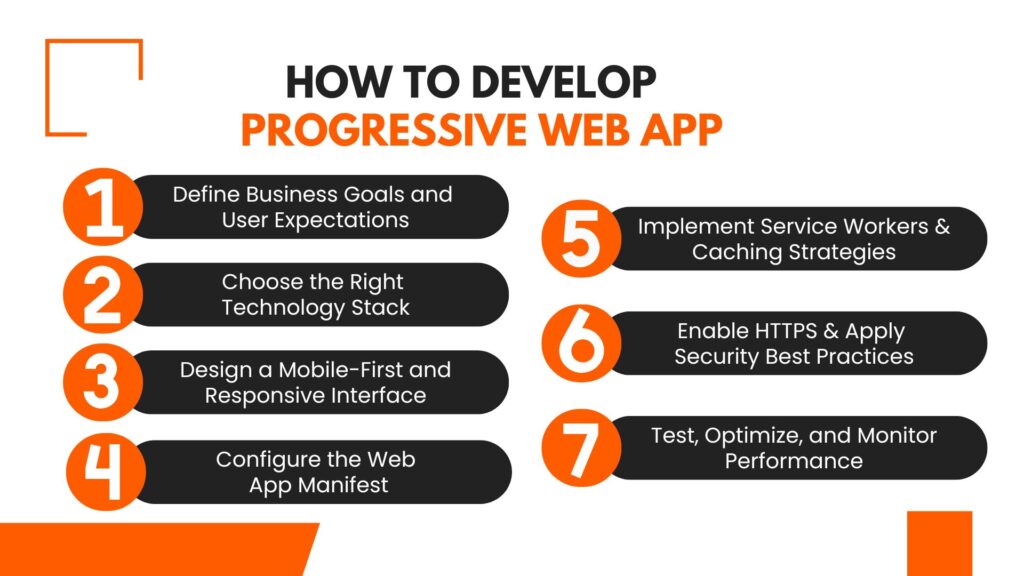
Step 1: Define Business Goals and User Expectations
Before writing code, it is critical to understand why you are building a PWA. Some businesses want faster load times, others want offline access, while some aim to reduce mobile app development costs. Defining these goals early helps determine which PWA features are essential and which are optional.
At this stage, teams should analyze user behavior, identify performance bottlenecks in the current web experience, and decide what actions must work offline. This clarity prevents over-engineering and keeps development aligned with business outcomes.
Step 2: Choose the Right Technology Stack
PWAs can be built using plain JavaScript, but most production-grade applications rely on modern frameworks such as React, Angular, or Vue. The choice of framework should depend on team expertise, scalability requirements, and long-term maintenance plans.
Equally important is backend readiness. APIs must be fast, secure, and optimized for caching. A slow backend will negate most PWA performance benefits.
Step 3: Design a Mobile-First and Responsive Interface
PWA development always starts with mobile users. Designing for smaller screens forces clarity and improves usability across all devices. Responsive layouts ensure that the application adapts smoothly to different screen sizes without sacrificing performance.
This step is where user experience design plays a major role. Navigation, touch interactions, and loading states must feel natural and intuitive.
Step 4: Configure the Web App Manifest
The web app manifest controls how the PWA appears when installed. It defines the app name, icons, colors, and display mode. A well-configured manifest ensures that the PWA feels like a real app when launched from the home screen.
At this stage, branding consistency is important. The goal is to make users forget they are using a website.
Step 5: Implement Service Workers and Caching Strategies
Service workers are the backbone of a PWA. They handle asset caching, offline access, and background tasks. Developers must choose appropriate caching strategies based on content type.
Static assets are usually cached aggressively, while dynamic content requires more controlled strategies to avoid outdated data. Poor caching decisions can lead to broken experiences, so this step requires careful testing.
Step 6: Enable HTTPS and Apply Security Best Practices
PWAs require HTTPS to function properly. Beyond this requirement, developers should implement security headers, protect APIs, and ensure secure authentication flows.
Security is not just a technical concern. It directly affects user trust and compliance with data protection standards.
Step 7: Test, Optimize, and Monitor Performance
Testing a PWA goes beyond functional testing. Teams must validate offline behavior, installation flows, and performance under different network conditions.
Tools like Lighthouse help identify issues related to performance, accessibility, and SEO. Continuous monitoring ensures that updates do not introduce regressions over time.
Progressive Web Apps vs Traditional Web Apps
Understanding the difference between Progressive Web Apps and traditional web apps helps businesses choose the right approach. While both run in browsers, their capabilities and user experiences differ significantly.
Key Differences at a Glance
| Aspect | Progressive Web Apps | Traditional Web Apps |
| Performance | Fast loading due to intelligent caching | Dependent on network speed |
| Offline Access | Works offline or on poor networks | Requires an active internet connection |
| Installation | Can be installed on the home screen | No installation support |
| User Engagement | Supports push notifications | No native push notifications |
| Updates | Automatic and seamless | Depends on page reloads |
| Security | Enforced HTTPS | HTTPS optional |
| Discoverability | Fully indexable by search engines | Fully indexable by search engines |
| Development Cost | Lower due to a single codebase | Lower initially, but limited capabilities |
| User Experience | App-like experience | Website-like experience |
Real-World Examples of Successful Progressive Web Apps
Global brands have successfully adopted PWAs to improve engagement and performance. Alibaba reported increased conversions after launching its PWA, particularly in mobile markets. Twitter Lite reduced data consumption while maintaining core functionality, making it accessible to a wider audience.
Trivago
Trivago implemented a Progressive Web App to improve performance across devices. The PWA loads faster, works reliably on slow networks, and delivers a smoother hotel search experience, helping increase user engagement and repeat visits, especially on mobile.
Alibaba
Alibaba adopted a PWA to reach mobile users more effectively in emerging markets. The PWA improved page load speed and user interaction, which led to higher engagement and increased conversion rates without requiring users to install a native app.
Twitter Lite
Twitter Lite is a well-known PWA that focuses on speed and low data usage. It provides core Twitter features with significantly reduced data consumption, making it accessible to users on slower networks and lower-end devices.
Progressive Web App Development Best Practices
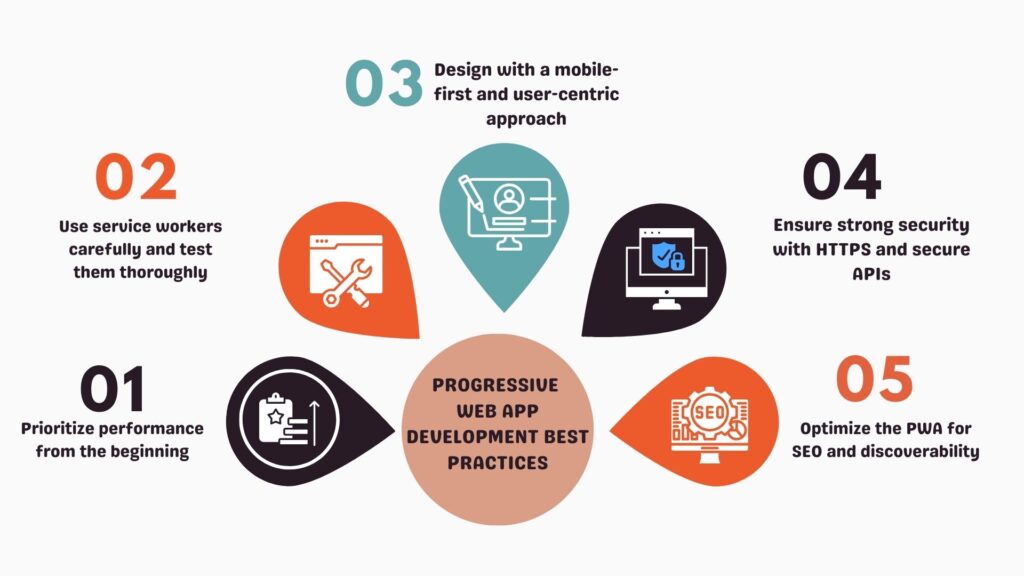
1. Prioritize performance from the beginning
Optimize loading speed, reduce JavaScript overhead, and implement smart caching to ensure fast performance on all network conditions.
2. Use service workers carefully and test them thoroughly
Service workers control offline behavior and caching. Poor implementation can cause outdated content or broken experiences, so testing is critical.
3. Design with a mobile-first and user-centric approach
Focus on intuitive navigation, touch-friendly interactions, and responsive layouts to deliver a true app-like experience.
4. Ensure strong security with HTTPS and secure APIs
Enforce HTTPS, protect user data, and follow security best practices to build trust and meet compliance standards.
5. Optimize the PWA for SEO and discoverability
Use clean URLs, proper indexing, and structured data so your Progressive Web App can rank well in search engines.
Why Choose CSSChopper for Progressive Web App Development
Choosing the right development partner is as important as choosing the right technology. Progressive Web App development requires a balance of performance optimization, user experience design, and long-term scalability. This is where an experienced team adds real value.
CSSChopper approaches PWA development with a business-first mindset. Instead of treating PWAs as a one-size-fits-all solution, the focus remains on understanding project goals, target users, and performance expectations before selecting the technical approach. This helps ensure that the final application delivers measurable outcomes rather than just technical features.
For organizations looking to explore Progressive Web Apps without unnecessary complexity, CSSChopper offers a practical and well-balanced development approach.
Categories
Recent Posts
Popular Posts
- How to Choose a Reliable Offshore Development Partner?
- Transforming Web Development with HTMX’s Declarative Approach for Dynamic UIs
- Top 15 Ecommerce Growth Strategies to Maximize Sales in 2026
- What is B2B Web Design? Benefits, Best Practices, and Examples
- Why Your Conversion Funnel Needs a Composable Commerce Solution?