- What Is WordPress?
- What Is Webflow?
- Webflow vs WordPress: Side-by-Side Comparison Table (2026 Updated)
- Webflow vs WordPress Pricing in 2026
- Webflow vs WordPress for Different Users (Who Should Choose What)
- Webflow vs WordPress: Pros and Cons (Honest Breakdown)
- Webflow Pros
- Webflow Cons
- WordPress Pros
- WordPress Cons
- Performance, SEO, and Core Web Vitals Comparison
- Webflow vs WordPress: Scalability and Enterprise-Level Requirements
- Final Verdict: Which One Should You Choose in 2026?
- Supercharge Your Website with Expert Webflow & WordPress Developers
Website building changed dramatically after the 2024 AI boom. What once took weeks of coding and plugin juggling could suddenly be generated, redesigned, and deployed in hours. Startups began launching websites over a single weekend.
Agencies shifted from manual builds to AI-assisted workflows. And businesses (small and large)started asking a new question: Which platform can help us move fastest without sacrificing scalability?
That’s where choosing the right CMS or no-code tool matters more than ever.
With AI shaping design, development, and optimization, your platform becomes the backbone of your digital strategy. Whether you’re a founder wanting simplicity, a designer chasing visual freedom, or an enterprise focused on performance and security, the decision can’t be taken lightly.
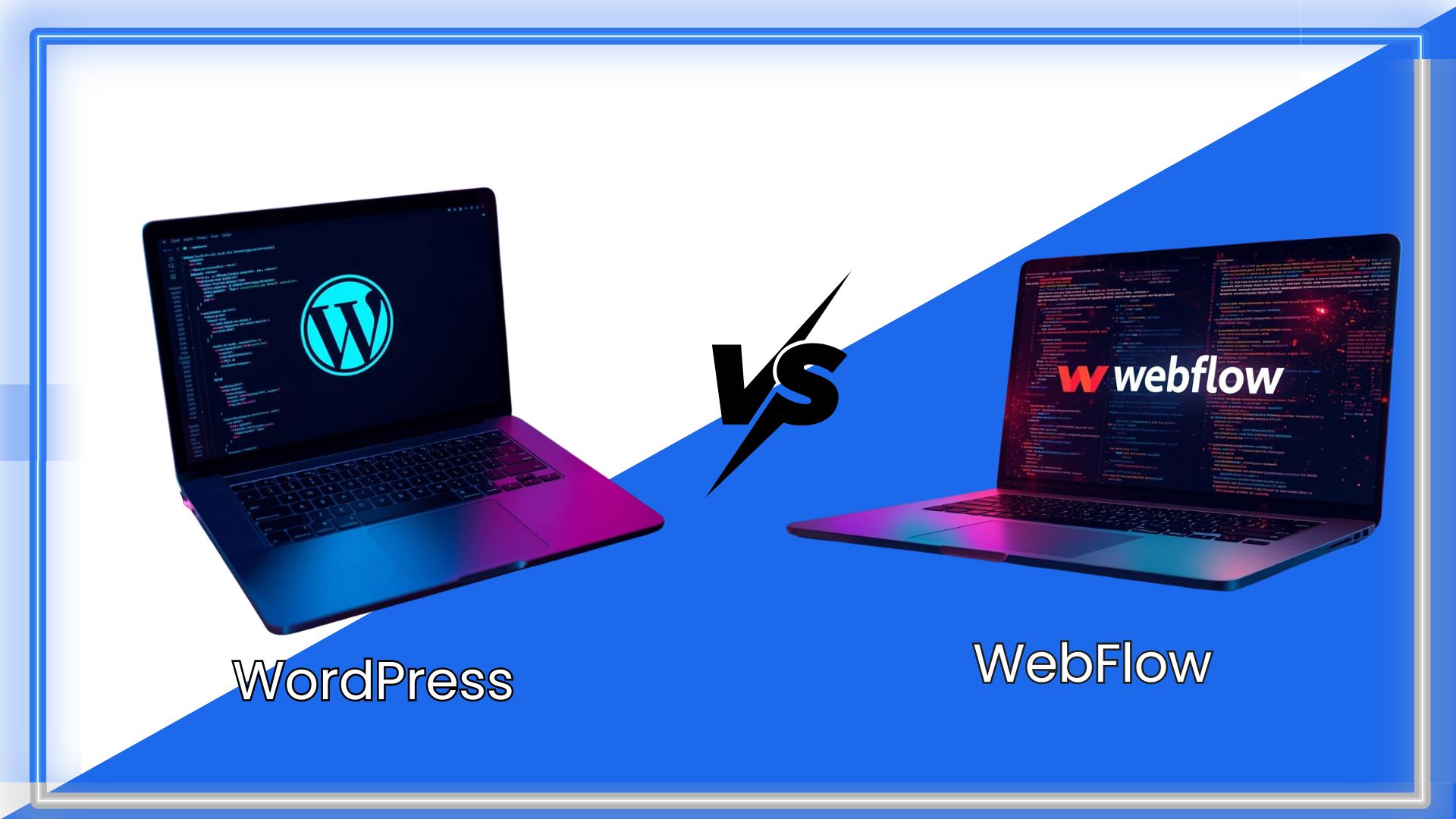
This Webflow vs WordPress comparison guide helps you choose the right platform for 2026, breaking down real differences in pricing, ease of use, speed, flexibility, and long-term scalability. Let’s get started.
What Is WordPress?
WordPress is an open-source content management system (CMS) that lets you build any type of website without needing advanced coding skills. Think of it as a flexible foundation on which you can create blogs, business sites, ecommerce stores, portfolios, or even complex enterprise platforms.
WordPress development comes in two versions, and the difference matters:
- WordPress.org is the self-hosted version. You download the software, choose your hosting, install themes or plugins, and customize every part of your site.
- WordPress.com is the hosted version. It’s simpler but offers less freedom and customization unless you upgrade to a higher plan.
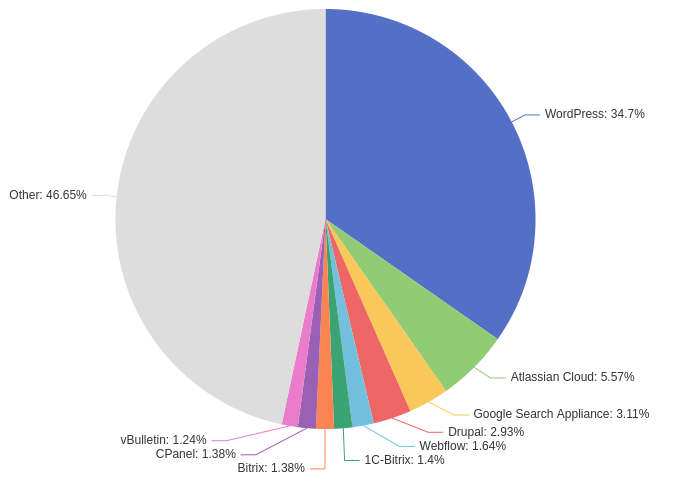
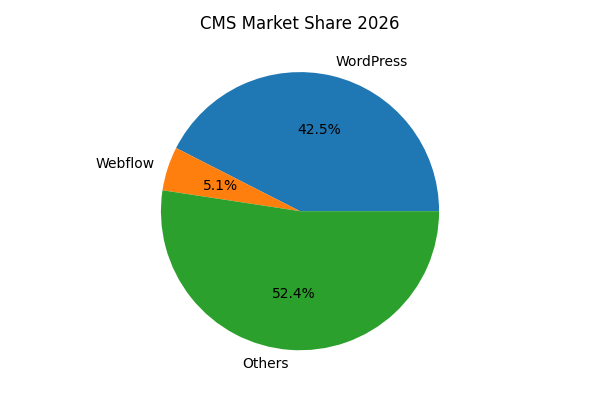
WordPress powers 42.5% of the internet due to its unmatched flexibility. With thousands of plugins and themes, it lets beginners get started easily while giving developers complete control under the hood.
What Is Webflow?
Webflow is a powerful no-code website builder that combines design freedom, CMS capabilities, and hosting in one seamless platform. The answer to the question of what is webflow used for is simple. It is used to build marketing sites, landing pages, portfolios, ecommerce stores, and even full-scale brand websites
Its rise in popularity, especially among designers, founders, and fast-moving startups, comes from one simple truth: Webflow lets you design visually while generating clean, production-ready code behind the scenes. No themes. No plugins. No tangled backend. Just a smooth, intuitive workflow that gives you pixel-perfect control.
To understand how does webflow work, picture a visual editor similar to Figma or Photoshop, but connected directly to HTML, CSS, and JavaScript. As you drag, style, animate, and structure elements, Webflow writes the code automatically. This combination of design freedom and technical reliability is exactly why Webflow has become a go-to platform in the no-code era.
Webflow vs WordPress: Side-by-Side Comparison Table (2026 Updated)
Before choosing a platform, it helps to look at a direct webflow vs wordpress comparison. Both tools are powerful, but they shine in different areas. Below is a clean, updated 2026 comparison across the factors that matter most:
| Comparison Factor | Webflow | WordPress |
| Ease of Use | Beginner-friendly, visual, minimal setup | Slight learning curve; depends on themes & plugins |
| Design Flexibility | Complete visual control; no themes | High flexibility, but requires themes/builders |
| Performance (Speed & Core Web Vitals) | Extremely fast by default with built-in CDN | Performance varies based on hosting and optimization |
| SEO Capabilities | Built-in SEO tools, auto-schema, clean code | Strong SEO via plugins like RankMath or Yoast |
| Plugins vs Native Features | Fewer plug-ins; more built-in functionality | 50,000+ plugins for anything you can imagine |
| Hosting | Fully managed hosting included | Requires external hosting provider |
| Security | Closed ecosystem; fewer vulnerabilities | Plugin vulnerabilities common; requires hardening |
| Customization | Visual + custom code | Unlimited backend and frontend customization |
| AI Automation Tools | Built-in AI layout suggestions & auto-optimization | Third-party AI tools, plugin-based |
| Cost | Transparent, tier-based pricing | Highly variable; hosting + premium plugins add cost |
Webflow vs WordPress Pricing in 2026
Cost is one of the most practical considerations when choosing between platforms. Understanding WordPress vs. Webflow cost helps you project your budget and long-term commitment.
How Much Does Webflow Cost?
Webflow uses a transparent subscription model that bundles hosting, security, and CMS into its plans. You can start building for free, but to publish a professional site with a custom domain, you’ll need a paid plan.
Webflow Pricing (2026 estimate):
| Plan Type | Monthly Cost | Who It’s For |
| Starter (Free) | $0 | Learning, experimentation, and very basic sites |
| Basic | ~$14/month | Simple business sites, portfolios |
| CMS | ~$23/month | Content-heavy sites and blogs |
| Business | ~$39/month | Higher traffic or marketing sites |
| Enterprise | Custom | Large organizations |
These prices typically include hosting, SSL, CDN, backups, and built-in SEO tools. These things you often pay for separately with other platforms.
So the question is, can I use Webflow for free? Yes, you can start with the free plan and explore the interface, but for a professional presence with your own domain and full features, a paid plan is essential.
WordPress Pricing (More Modular)
The WordPress core software itself is free. This is a big reason for wordpress popularity.
But free doesn’t mean zero cost. To run a real site, you’ll need:
- Hosting: $3–$50+ per month (shared hosting is cheapest; managed hosting costs more).
- Domain Name: ~$10–$15 per year.
- Premium Themes: $30–$100 (one-time or annual).
- Plugins: $0–$300+ each for SEO, forms, ecommerce, security, etc.
- Maintenance & Security: Optional managed services can run $20–$150/month.
So while WordPress may appear cheaper upfront, those modular costs add up. For example, investing in performance, ecommerce, and premium management tools will bump up your yearly expenses.
Total Cost of Ownership (TCO)
It often helps to zoom out and look at total cost of ownership:
| Expense Category | Webflow (Annual | WordPress (Annual) |
| Hosting + CMS | Included in plan | $60–$600+ |
| Domain | $10–$15 | $10–$15 |
| Themes / Design | Optional | $30–$100+ |
| Plugins / Extensions | Optional | $50–$300+ |
| Security & Maintenance | Included | $0–$150+ |
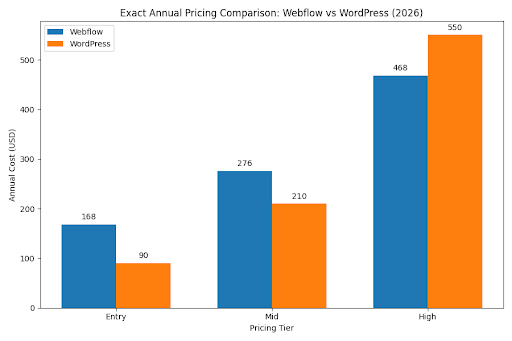
| Approx. Annual Cost | $180–$468 | $150–$1,000+ |
The exact numbers depend on your needs, but Webflow’s all-in pricing often results in more predictable budgets, whereas WordPress costs can vary widely depending on add-ons and maintenance.
Webflow vs WordPress for Different Users (Who Should Choose What)
Different users have different priorities. Some want simplicity, some want control, some want speed, and others need scale. Here’s a clear breakdown to help you decide which platform fits your needs like a glove.
1. For Beginners
If you’re just starting out, Webflow offers a far smoother ride. Its visual editor makes building pages feel almost like arranging blocks on a canvas. No plugins, hosting setup, or technical hurdles. WordPress is beginner-friendly too, but it comes with a mild learning curve, especially when dealing with hosting, themes, and updates.
Best choice: Webflow for simplicity; WordPress if you plan to learn and grow into more advanced customization.
2. For Designers
Designers absolutely love Webflow. It’s the closest you’ll get to turning a Figma layout into a real, responsive website, without touching messy code. Animations, interactions, grids, and layouts all work visually. Designers who want aesthetic freedom find Webflow liberating.
WordPress can match 100% of Webflow’s design output, but only with page builders like Elementor, Oxygen, or Bricks, which require more time and setup.
Best choice: Webflow, hands down.
3. For Developers
Developers typically prefer WordPress because it’s infinitely customizable. You can modify core files, build custom plugins, add APIs, manage databases, and control backend logic. It’s a playground for technical minds.
Webflow supports custom code, too, but it’s mainly front-end. You can embed scripts, integrate APIs, and build logic using attributes, but you can’t build full custom backend systems.
Best choice: WordPress for total control.
4. For Bloggers & Content Sites
WordPress is still the king of blogging. Its editor, taxonomies, plugins, SEO tools, and publishing workflows are built for content-heavy sites. If your business revolves around long-form content, you’ll appreciate WordPress’s maturity.
Webflow’s CMS is elegant, visual, and powerful, but better suited for structured content, think portfolios, case studies, and marketing pages, rather than large editorial operations.
Best choice: WordPress for content-rich websites; Webflow for lightweight CMS needs.
5. For Ecommerce (WooCommerce vs Webflow Ecommerce)
WooCommerce development on WordPress enables deep ecommerce customization, including subscriptions, memberships, multi-vendor, digital goods, advanced shipping rules, and more. It’s incredibly flexible.
Webflow Ecommerce is simpler, cleaner, and design-driven, perfect for small- to mid-sized stores that prioritize branded buying experiences over complexity.
Best choice: Webflow for beautifully designed, minimal ecommerce; WordPress/WooCommerce for advanced selling.
6. For Enterprises
This is where the conversation gets interesting. The webflow vs wordpress for enterprises discussion depends heavily on structure and scale.
Webflow Enterprise is ideal for:
- Marketing websites
- Global landing page systems
- Secure, high-speed deployments
- Creative control without developer dependency
WordPress Enterprise is ideal for:
- Large content ecosystems
- Complex workflows and multi-role permissions
- API-driven systems or headless architecture
- Enterprise hosting like WPVIP, Pantheon, WPEngine
Webflow vs WordPress: Pros and Cons (Honest Breakdown)
When comparing the two platforms, an honest Webflow vs WordPress pros cons breakdown can save you from expensive mistakes. Here’s the truth, backed by real-world usage and examples.
Webflow Pros
1. No Maintenance Required
Webflow is fully hosted, which means it handles updates, security patches, backups, and performance optimization automatically. No need to worry about plugin conflicts or site breakage.
Example: A marketing team can update landing pages without having to call a developer every month for fixes or updates.
2. Pixel-Perfect Visual Design
Everything in the visual builder is editable. You see exactly what you’re designing. No guessing, no theme limitations.
3. Built-In Performance Boosts
CDN, caching, minification, SSL, and optimized code are included by default. Most Webflow sites pass Core Web Vitals effortlessly.
Webflow Cons
1. Limited Backend Customization
You can add custom code, but you can’t build custom backend logic, database structures, or complex workflows like you can in WordPress.
2. Ecommerce Limitations
Great for small- to mid-sized stores but not suitable for advanced workflows like multi-vendor setups or subscription ecosystems.
3. Can Get Expensive at Scale
Multiple sites mean multiple plans, and the costs add up unless you’re on Webflow Enterprise.
WordPress Pros
1. Unlimited Customization
One of the biggest benefits of custom WordPress development is that you can build anything from LMS platforms to marketplaces using custom plugins, headless setups, or backend coding.
Example: A news site with 30,000+ articles, advanced search, user roles, and server-side caching runs more efficiently on WordPress than Webflow.
2. Massive Plugin Ecosystem
50,000+ plugins allow you to extend functionality without reinventing the wheel.
3. Flexible for Any Business Model
Ecommerce, membership sites, forums, directories, multisite networks, WordPress does it all.
WordPress Cons
1. Maintenance Required
Updates for themes, plugins, and WordPress core are frequent. When one update breaks something, it’s “brace yourself” time.
2. Security Risks from Third-Party Plugins
Most hacks originate from outdated or poorly coded plugins. You must maintain security hygiene.
3. Performance Depends on Hosting
A cheap hosting plan equals a slow site. To match Webflow’s performance, you need quality hosting, caching, and optimization plugins.
Performance, SEO, and Core Web Vitals Comparison
Performance is no longer a “nice-to-have”, it’s the lifeline of modern websites. Google’s algorithm updates in 2024 and 2025 made speed, stability, and mobile experience crucial ranking signals. So how do Webflow and WordPress stack up in real-world tests?
1. Real-World Speed Differences
In speed tests, Webflow often outperforms WordPress because it delivers optimized, production-ready code with minimal overhead. The platform uses clean HTML and CSS, loads fewer external scripts, and ships pages that naturally pass Core Web Vitals.
WordPress can be very fast too but only with the right hosting + caching + optimization setup. A poorly configured WP site can feel like running a Ferrari on a dirt road
Typical Results:
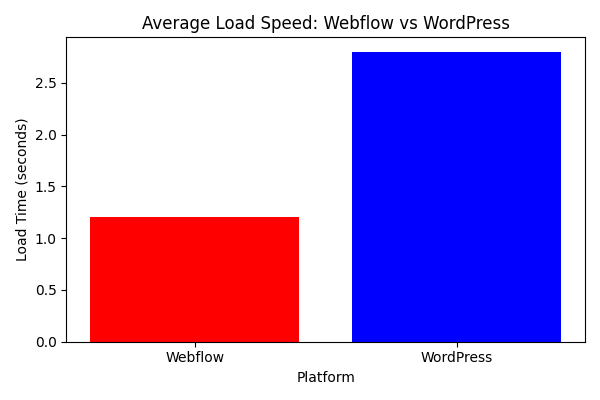
- Webflow: 1–1.5s load time out of the box
- WordPress: 2–3.5s depending on hosting and plugins
These aren’t hard rules, but common patterns seen across thousands of builds.
2. CDN, Caching, and Server Response
Webflow
- Global CDN (Fastly + AWS)
- Automatic caching
- HTTP/2, SSL, minification
- No server configuration required
It’s “plug-and-play” performance, and everything is managed.
WordPress
- CDN optional (Cloudflare, BunnyCDN, etc.)
- Caching via plugins (WP Rocket, W3TC, LiteSpeed)
- Server response varies by hosting provider
- Requires configuration, testing, and updates
When optimized, WordPress can be lightning fast, but the responsibility lies with developers.
3. SEO Control (Webflow SEO vs Yoast/RankMath)
Webflow SEO Features
Webflow builds SEO right into the platform:
- Auto-generated sitemap
- Clean semantic HTML
- Custom meta titles & descriptions
- Built-in 301 redirects
- Alt text, OpenGraph tags, canonical tags
- Automatic XML sitemap updates
- Schema for basic structures
It’s straightforward, fast, and ideal for marketing teams.
WordPress SEO Plugins
Plugins like Yoast or RankMath give deeper, enterprise-grade control:
- Automated schema for every post type
- Content scoring + readability checks
- XML, HTML, and video sitemaps
- Internal linking suggestions
- Redirect managers
- Local SEO
- WooCommerce SEO
WP requires setup but delivers unparalleled flexibility.
4. AI SEO Features in 2026
The post-2024 AI boom brought generative SEO to both platforms:
Webflow’s AI SEO Tools (2026)
- AI-powered alt text suggestions
- Automated meta descriptions
- Intelligent heading restructuring
- Layout recommendations for better UX
- Accessibility improvements through AI auditing
WordPress AI Tools (2026)
Through plugins, WP supports:
- AI keyword clustering
- NLP-driven content scoring
- AI internal linking automation
- AI schema markup generation
- Dynamic FAQ generation
- AI-driven SERP tracking
Both platforms have embraced AI. Webflow saw a 34% YoY increase in adoption in 2025 because it integrates natively. WordPress offers deeper functionality through third-party tools.
5. Schema, Sitemaps, Redirects & Indexing Controls
Webflow
- Auto schema for common CMS types (blog, product, portfolio)
- Auto sitemaps with zero setup
- Visual 301 redirect manager
- Built-in robots.txt editor
- Manual control over indexing per page
- Canonical tag support
WordPress
With plugins like RankMath:
- Full schema library (FAQ, How-To, Product, Article, Event, Local Business, etc.)
- Step-by-step sitemap control
- Advanced 301/302/307 redirects
- Indexing rules per post, taxonomy, or archive
- Deep control over canonical rules
- Schema graphs and entity relationships
WP wins on depth; Webflow wins on simplicity.
Webflow vs WordPress: Scalability and Enterprise-Level Requirements
When it comes to enterprise-level needs, scalability becomes the real battlefield. Large organizations care about performance, integrations, security, uptime, workflows, and global delivery. Here’s how Webflow and WordPress compare when the stakes are higher and the requirements more complex.
1. Multi-Location Websites
Webflow
Webflow’s global CDN and visual CMS make it ideal for digitally consistent, multi-location marketing sites. Enterprises can duplicate structures, reuse components, and maintain brand consistency across dozens of localized pages or microsites.
WordPress
WordPress multisite is built precisely for this scenario. It allows enterprises to manage multiple sites from a single dashboard while sharing themes, plugins, and administrative control. This makes WordPress exceptionally powerful for franchises, universities, and global brands with multiple sub-sites.
Winner:
- Webflow for design-led multi-location marketing
- WordPress for full multisite governance and operations
2. API Integrations
Webflow
Webflow supports API integrations through:
- Webflow API (content import/export)
- Custom code embeds
- Third-party tools like Zapier, Make, and n8n
- Attributes-based workflows for dynamic logic.
However, backend-level API integrations are limited.
WordPress
WordPress is built for integrations. APIs can be consumed, sent, or fully customized via:
- REST API
- GraphQL (via plugins like WPGraphQL)
- Custom plugin development
- CRM, ERP, and cloud service integrations
- Headless environments
For enterprises with complex data flows, WordPress offers much deeper integration potential.
Winner: WordPress for advanced API-heavy ecosystems.
3. Multilingual Support
Webflow
Webflow’s localization features (introduced post-2023) support multi-language sites with subdirectories, language-specific content, and dynamic translations. It’s great for small to mid-sized businesses needing 2–5 languages.
WordPress
WordPress dominates here. With plugins like WPML, Polylang, or Weglot, enterprises can manage dozens of languages, translation workflows, localization rules, and region-based content variations.
Enterprises with global footprints typically prefer WordPress for its depth of language control.
Winner: WordPress for global-scale multilingual operations.
4. Headless CMS Comparison
Webflow as Headless
Webflow supports content APIs, but its headless capabilities are still limited. It works well for simple headless use cases or when using Webflow as a content source for external front-ends.
WordPress as Headless
WordPress is a leader in the headless commerce CMS space. You can decouple the backend and use React, Next.js, Gatsby, Vue, or any front-end framework with:
- WP REST API
- WPGraphQL
- Headless hosting (e.g., Pantheon, WP Engine, Atlas)
- Cloud-native architectures
Enterprises needing omnichannel content distribution, like apps, kiosks, and in-store displays, often choose WordPress headless.
Winner: WordPress by a wide margin.
5. Enterprise Security & SLAs
Webflow Enterprise Security:
- SOC 2 Type II compliance
- SSO & enterprise authentication
- Advanced DDoS mitigation
- Global hosting powered by AWS
- 99.99% uptime SLAs
- Audit logs and team workflows
- No plugin vulnerabilities
This makes Webflow a strong choice for marketing-led enterprise teams wanting secure, scalable, low-maintenance infrastructure.
WordPress Enterprise Security
With managed hosting partners like WP Engine, Kinsta, Pantheon, and WordPress VIP, enterprises get:
- SOC 2 or ISO-certified datacenters
- Enterprise-grade firewalls
- Dedicated SLAs
- Automated updates & security scans
- Advanced caching + CDN layers
- Full server access for audits and compliance
But unlike Webflow, security varies depending on the hosting provider and development practices. It’s only as strong as the team maintaining it.
Winner:
- Webflow for low-maintenance enterprise security
- WordPress for maximum control and compliance configurability
Final Verdict: Which One Should You Choose in 2026?
Choosing between Webflow vs WordPress in 2026 isn’t about picking the “better” platform. It’s about choosing the one that aligns with your goals, skills, and long-term strategy. Each platform shines in a different arena, and your decision should be grounded in practicality, not hype.
- If ease of use is your priority, Webflow takes the lead. Its visual builder, zero-maintenance hosting, and built-in performance tools make it ideal for founders, designers, marketers, and teams who want to move fast without technical bottlenecks.
- If performance and stability matter, Webflow wins straight out of the box, while WordPress can match or exceed it only with proper hosting, caching layers, and optimization.
- If pricing consistency matters, Webflow offers predictable costs, while WordPress can be cheaper or more expensive depending on your hosting, themes, and plugins.
- If scalability or customization is the goal, WordPress becomes the powerhouse, especially for large blogs, complex workflows, enterprise systems, headless builds, or data-heavy platforms.
So, what’s the recommendation?
- Choose Webflow if you want a fast, secure, visual, no-maintenance platform for marketing sites, portfolios, landing pages, and design-led experiences.
- Choose WordPress if you need deep customization, complex architectures, ecommerce flexibility, headless builds, or large-scale content operations.
Supercharge Your Website with Expert Webflow & WordPress Developers
We’ve built, optimized, migrated, and scaled hundreds of enterprise-grade websites across both Webflow and WordPress development services over the last decade.
Our experience includes:
- Migrating legacy CMS systems
- Developing enterprise WordPress solutions
- Scaling Webflow Enterprise sites
- Implementing SEO automation and Core Web Vitals optimization
- Running high-traffic architectures across AWS, GCP & Webflow hosting
This guide comes not from theory, but from hands-on execution, experiments, failures, improvements, and real enterprise deployments. Get a high-performance website built for speed, SEO, and scalability. Whether you need Webflow specialists or want to hire professional WordPress developers, CSSChopper delivers tailor-made solutions that drive real results.
Tags
Categories
Recent Posts
Popular Posts
- How to Choose a Reliable Offshore Development Partner?
- Transforming Web Development with HTMX’s Declarative Approach for Dynamic UIs
- Top 15 Ecommerce Growth Strategies to Maximize Sales in 2026
- What is B2B Web Design? Benefits, Best Practices, and Examples
- Why Your Conversion Funnel Needs a Composable Commerce Solution?